Understanding cloud-based application security testing

Cloud-native adoption has reshaped how modern engineering teams build and scale applications, and with that shift comes a new set of security challenges. Traditional, on-premise security testing approaches often struggle to keep pace with distributed architectures, ephemeral infrastructure, API-driven communication, and rapid CI/CD release cycles.
This is where cloud-based application security testing becomes essential. This guide breaks down the fundamental categories of security testing, what each solves, how they operate in the cloud, and how to integrate them into your development workflow.
What is cloud-based application security testing?
Cloud-based application security testing refers to security scanning and vulnerability detection performed using cloud-hosted tools or platforms rather than on-premise installations. These services test your web applications, APIs, and code by running analyses in the cloud; allowing for scalability, automation, continuous testing, and easier integration with CI/CD workflows.
Types of cloud-based application security testing tools
Security testing isn’t a single category but rather a collection of complementary approaches. Each solves a different part of the security problem, and understanding how they fit together is crucial when evaluating cloud based web application security testing solutions.
Below is an overview of the major categories of cloud-based application security testing tools, along with examples and use cases. We’ll also reference this resource for deeper exploration of tools:
Dynamic Application Security Testing (DAST)
DAST focuses on evaluating an application exactly the way an external attacker would: from the outside in, without requiring access to source code. The goal is to understand how the application behaves at runtime and identify exploitable weaknesses that only surface once the system is actually running. This includes authentication flows, input validation, session handling, and configuration issues that static code scanners can’t see.
Platforms: Beagle Security, OWASP ZAP
How DAST works in the cloud:
Runs scans from cloud agents without requiring local infrastructure.
Can cover multiple environments (QA, staging, pre-production).
Allows concurrent or scheduled tests for continuous security validation.
Best for:
Identifying real exploitable vulnerabilities
Testing cloud-deployed, containerized, or microservices-powered apps
DevOps teams needing automated security in CI/CD
Security champions validating runtime behavior
Static Application Security Testing (SAST)
SAST takes a code-first approach by analyzing the application’s source code, bytecode, or binaries before the application is compiled or executed. It searches for insecure programming patterns, hardcoded secrets, unsafe functions, and flawed logic that may lead to vulnerabilities if pushed into production. By shifting security left in the development lifecycle, SAST enables developers to catch and fix issues early. This reduces rework, improves code quality, and helps in establishing consistent secure coding standards across the engineering team.
Platforms: Semgrep, SonarQube Cloud
How SAST works in the cloud:
Fully hosted scanners inspect code on push, pull request, or scheduled intervals.
Integrates tightly with GitHub, GitLab, Bitbucket, and CI platforms.
Provides rulesets tailored to languages/frameworks in your stack.
Best for:
Developer-first security practices
Catching vulnerabilities pre-build
Enforcing secure coding standardization
Reducing fix time and eliminating risky patterns early
API security testing
API security testing focuses specifically on the interfaces that power modern cloud applications such as REST, SOAP, GraphQL, and internal microservices. Unlike traditional UI-driven testing, which views the application through the browser layer, API security testing inspects the underlying endpoints directly to uncover broken access control, schema exposures, weak authentication, and injection risks. Since APIs often handle sensitive business logic and data exchange, this form of testing ensures that the services driving the application remain protected even when the UI isn’t involved.
Platforms: Beagle Security, 42Crunch
How API security testing works in the cloud:
Cloud scanners import API specs (OpenAPI/Swagger/GraphQL schemas).
Automatically explore and test endpoints for vulnerabilities.
Handle OAuth flows, JWT tokens, multi-step authentication, and complex payloads.
Best for:
Microservices-heavy or API-first architectures
Protecting distributed services and internal APIs
Detecting business logic issues not visible in UI-driven scans
Ensuring API governance and schema security
Interactive Application Security Testing (IAST)
IAST works from within the application by instrumenting it during runtime, giving deep visibility into how the code executes while tests or user interactions occur. Unlike SAST (static) and DAST (external), IAST blends both perspectives by observing actual runtime behavior with code-level context. This allows the tool to detect vulnerabilities more precisely, reduce false positives, and uncover issues tied to specific execution paths. It is particularly valuable in complex or highly dynamic cloud environments where understanding how the application behaves internally is essential.
Platforms: Contrast Security, Acunetix IAST
How IAST works in the cloud:
Cloud dashboards collect telemetry from instrumentation agents.
Works alongside functional or automated QA tests.
Provides context-rich insights due to in-app monitoring.
Best for:
Teams wanting deeper code-level understanding without manual review
Complex cloud applications where reproducible behavior matters
Reducing false positives through contextual data
Software Composition Analysis (SCA)
SCA focuses on the security of your application’s open-source and third-party dependencies—the packages, libraries, and modules your software relies on. These components often make up a large percentage of modern cloud-native applications, and vulnerabilities in them can pose serious risks. SCA identifies outdated packages, known CVEs, license conflicts, and supply chain threats that arise from using external code. By continuously monitoring for newly discovered vulnerabilities, SCA ensures applications remain secure even after deployment.
Platforms: Snyk, Mend.io
How SCA works in the cloud:
Integrates with repositories and package managers (npm, Maven, PyPI, etc.).
Scans dependency manifests and lockfiles.
Monitors for newly disclosed CVEs and zero-day risks.
Best for:
Reducing open-source supply chain vulnerabilities
Automatically patching or upgrading packages
Dependency governance in large engineering organizations
Summary table
| Type | Purpose | Platforms |
|---|---|---|
| DAST | Test running apps for runtime vulnerabilities | Beagle Security, ZAP |
| SAST | Scan source code for insecure patterns | Semgrep, SonarQube |
| API security testing | Secure REST/GraphQL APIs | Beagle Security, 42Crunch |
| IAST | Instrument apps to detect issues during runtime | Contrast Security, Acunetix |
| SCA | Identify vulnerable dependencies | Snyk, Mend.io |
Best practices for cloud-based application security testing
To get the most out of cloud-based application security testing, your approach should align with your development lifecycle and cloud architecture.
Below are best practices to guide implementation:
Integrate testing early in CI/CD pipelines (“shift left”).
Test frequently, preferably every pull request or build.
Use a combination of SAST, SCA, DAST, and API testing; no single method is enough.
Ensure scanners support cloud authentication flows (OAuth, JWT, SSO, API tokens).
Run authenticated and unauthenticated tests for better coverage.
Automate as much as possible. Manual testing doesn’t scale in cloud pipelines.
Use cloud dashboards to track trends, not just individual findings.
Prioritize based on exploitability, not just severity.
Validate results in staging environments that mirror production.
Ensure scanners support microservices, containers, and dynamic infrastructure.
Example workflow for cloud-based application security testing
Every team’s cloud setup is different, so the best workflow is the one built around your architecture and deployment process. Here’s a simple way to create your own:
1. Map your development lifecycle
Identify where code moves. This shows you the natural points to insert security checks.
2. Choose the security tests you need
Pick the right mix based on your application:
SAST + SCA for code and dependencies
DAST + API testing for runtime behavior
IAST or container/IaC scans for cloud-native systems
3. Assign the right test to the right stage
Use fast scans early, deeper scans later:
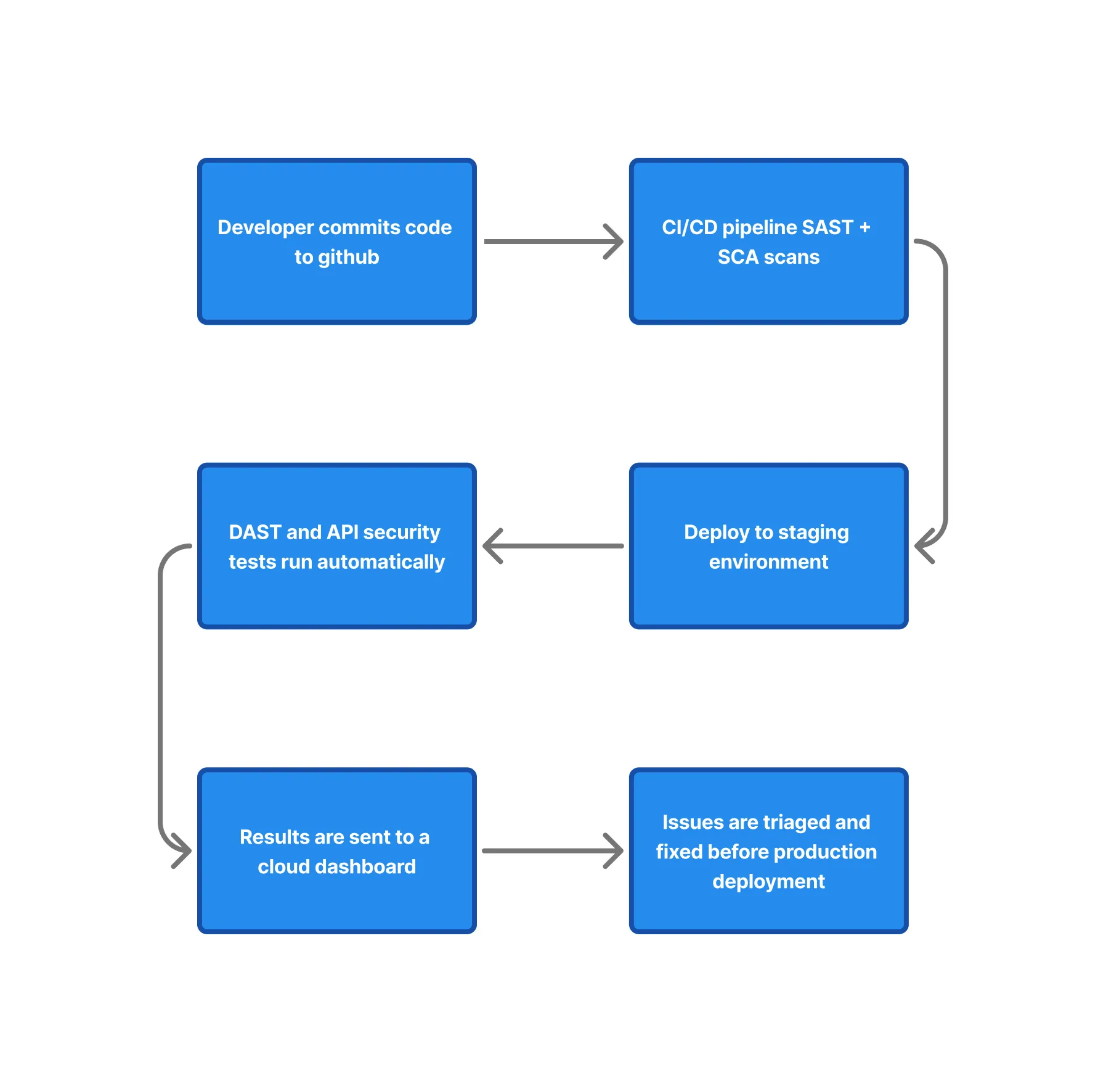
PR: quick SAST, SCA
Post-build: full SAST/SCA + container scans
Staging: DAST + API tests
4. Ensure staging mirrors production
Match authentication, configs, and routes so cloud-based tests give accurate results.
5. Automate wherever possible
Trigger scans automatically, reuse credentials safely, and pipe results into dashboards or issue trackers.
6. Define clear release gates
Decide which findings block PRs, staging deployments, or production releases.
7. Review and refine continuously
Update your workflow quarterly as your architecture and security needs evolve.
Below is a practical example showing how security testing fits into a modern cloud-native development workflow. This is just one approach, you can modify it to match your pipeline architecture.
Final thoughts
Cloud-native development brings enormous speed and flexibility, but it also raises the stakes for robust, continuous security testing. Using cloud-based application security testing tools allows teams to automate, scale, and operationalize security without slowing down development velocity.
By understanding the differences between DAST, SAST, API security testing, IAST, and SCA, engineering leaders and technical decision-makers can build a testing strategy that aligns with their architecture and maturity. No single tool does everything, but together, these categories create a comprehensive, cloud-ready security testing stack.
As your cloud footprint grows, the tools you choose will define how effectively you safeguard your applications. Investing in the right combination of cloud-based application security testing tools ensures you stay ahead of vulnerabilities, maintain compliance, and ship secure software at scale.
If you’re exploring modern DAST and API security testing built for cloud-native environments, Beagle Security offers an advanced automated testing platform that might suit your needs. Check out our free 14-day trial and the interactive demo so you can evaluate it in your own workflow.


![Top ZAP alternatives and competitors [October 2026]](/blog/images/top-zap-alternatives-cover.webp "Top ZAP alternatives and competitors [October 2026]")




![Top 10 penetration testing companies [2026]](/blog/images/top-penetration-testing-companies-cover.webp "Top 10 penetration testing companies [2026]")



![Top vendor application security tools [2026]](/blog/images/top-vendor-application-security-testing-tools-2026-cover.webp "Top vendor application security tools [2026]")



![Top Snyk alternatives & competitors [2026]](/blog/images/top-snyk-alternatives-cover.webp "Top Snyk alternatives & competitors [2026]")