The 2025 guide to web server security

Web servers sit at the core of every online operation in the internet. From SaaS platforms and eCommerce stores, to enterprise portals and internal applications, they host critical data, run web applications, and act as gateways to your digital assets. Unfortunately, that also makes them prime targets for cyberattacks.
This 2025 guide to web server security explores what it means to secure a web server, the most common vulnerabilities attackers exploit, best practices for hardening your systems, and the top tools security teams rely on to stay protected.
Whether you’re a CTO, CISO, or IT security manager, understanding and implementing effective web server security controls is essential to safeguard your infrastructure, ensure compliance, and maintain business continuity.
What is web server security?
Web server security refers to the set of protective measures, configurations, and monitoring practices used to safeguard web servers from unauthorized access, data breaches, and cyberattacks.
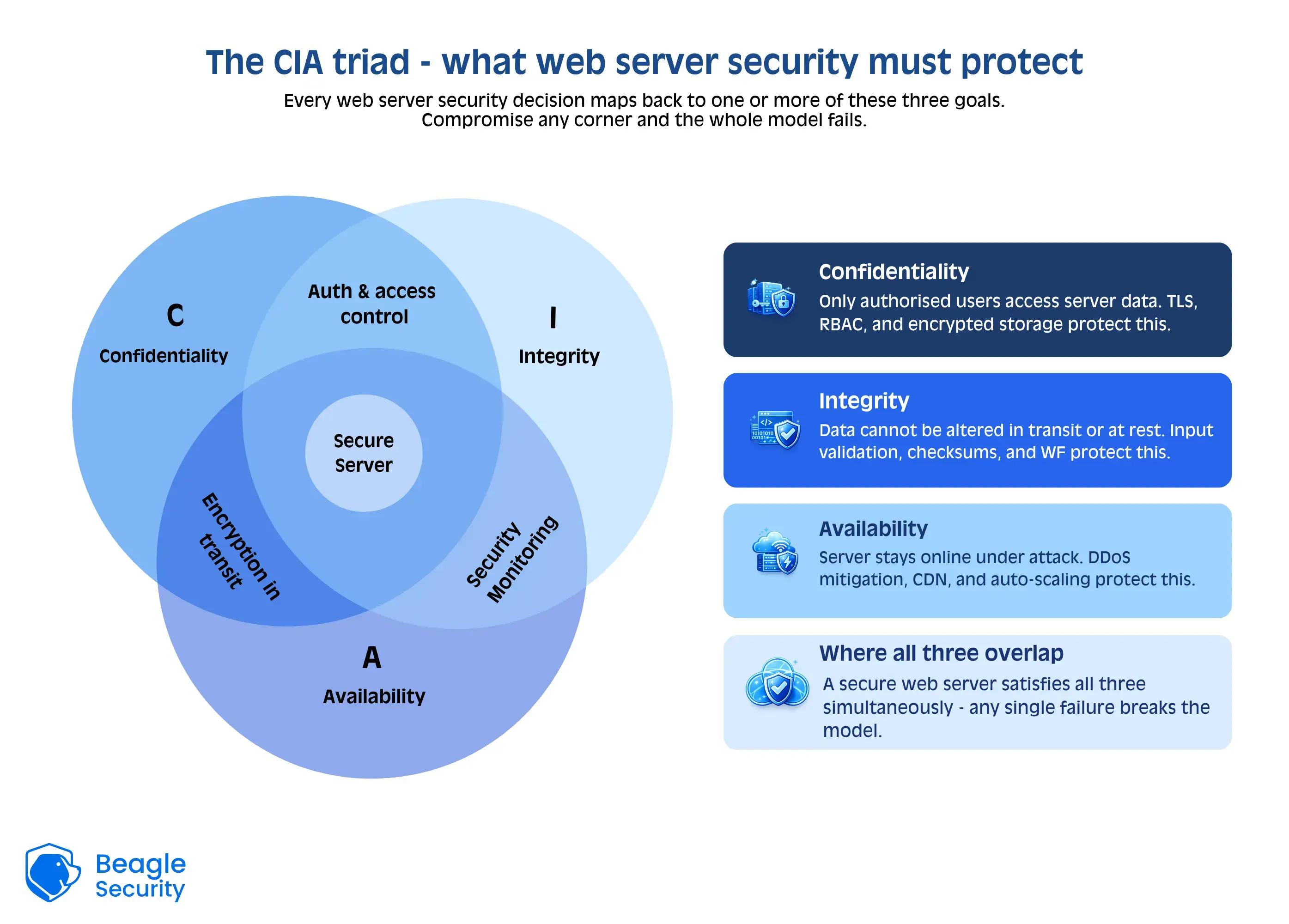
At its core, it’s about ensuring the confidentiality, integrity, and availability of your web applications and the data they handle.
A secure web server should:
Allow only legitimate users and applications to interact with it.
Detect and prevent intrusion attempts.
Protect sensitive information both in transit and at rest.
Maintain consistent performance even under attack.
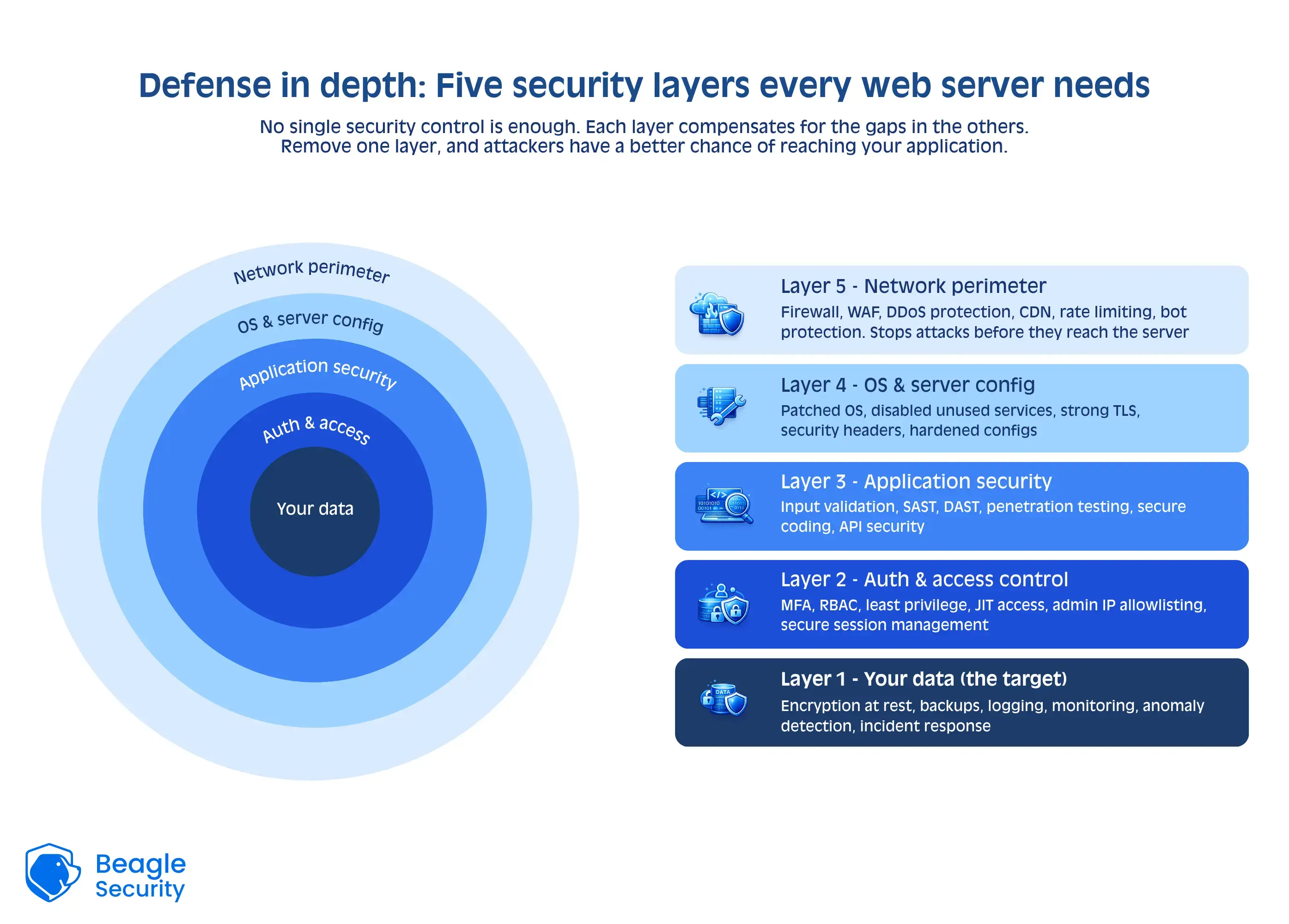
In 2025, web server security is no longer just about installing a firewall or running antivirus software. It involves layered protection combining network security, application security, configuration management, and continuous vulnerability assessment to proactively identify and address potential attack vectors.
Common web server vulnerabilities
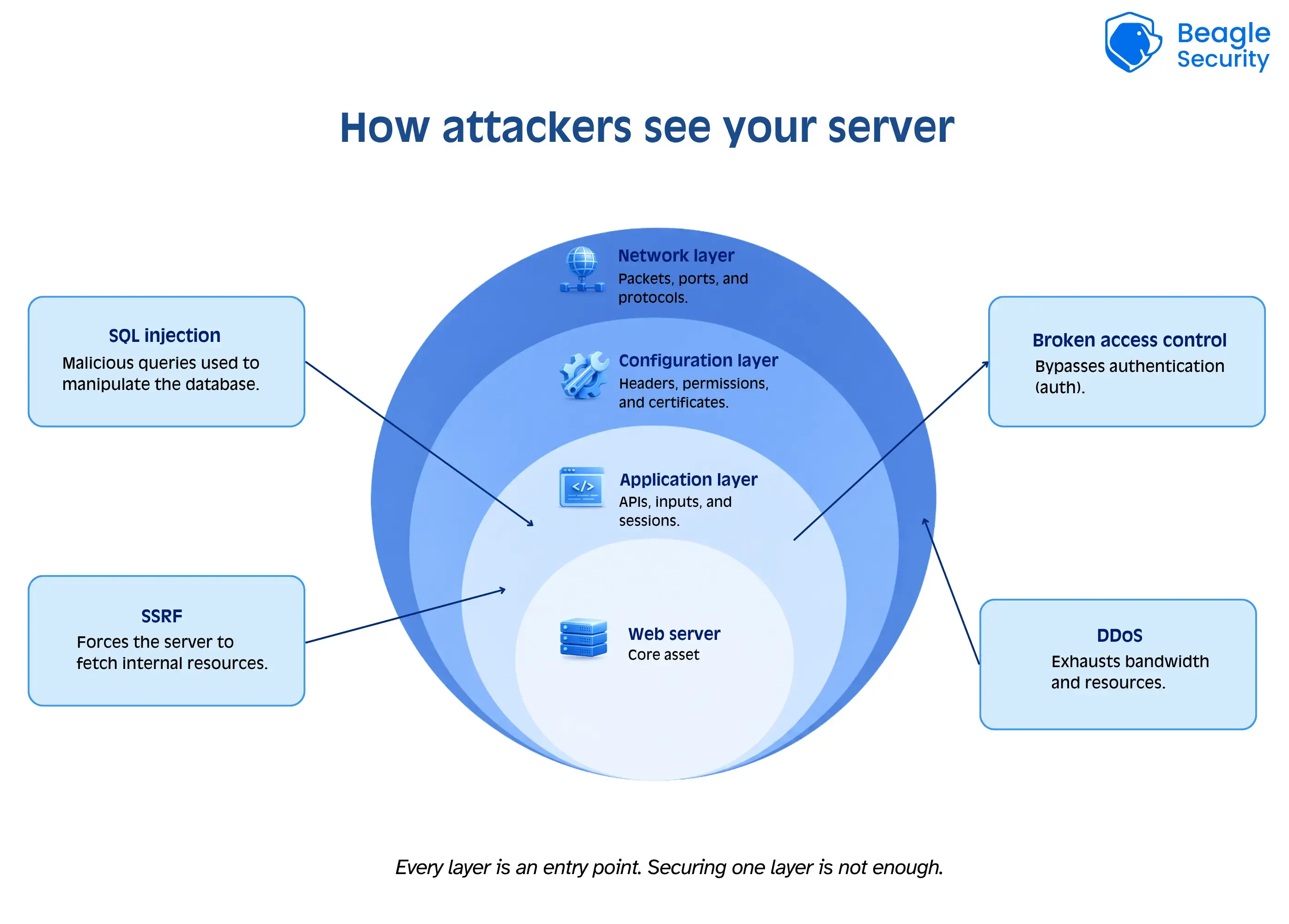
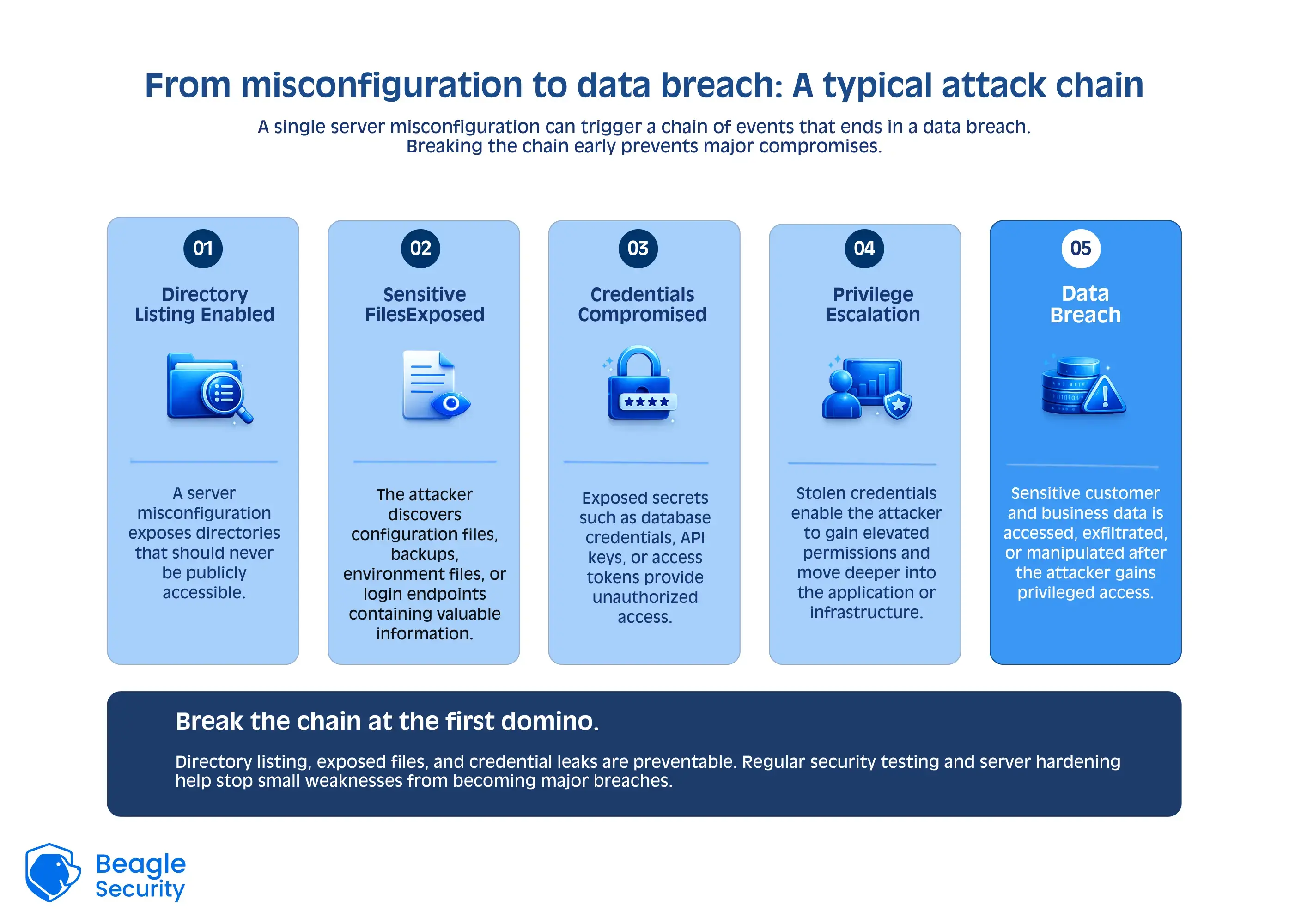
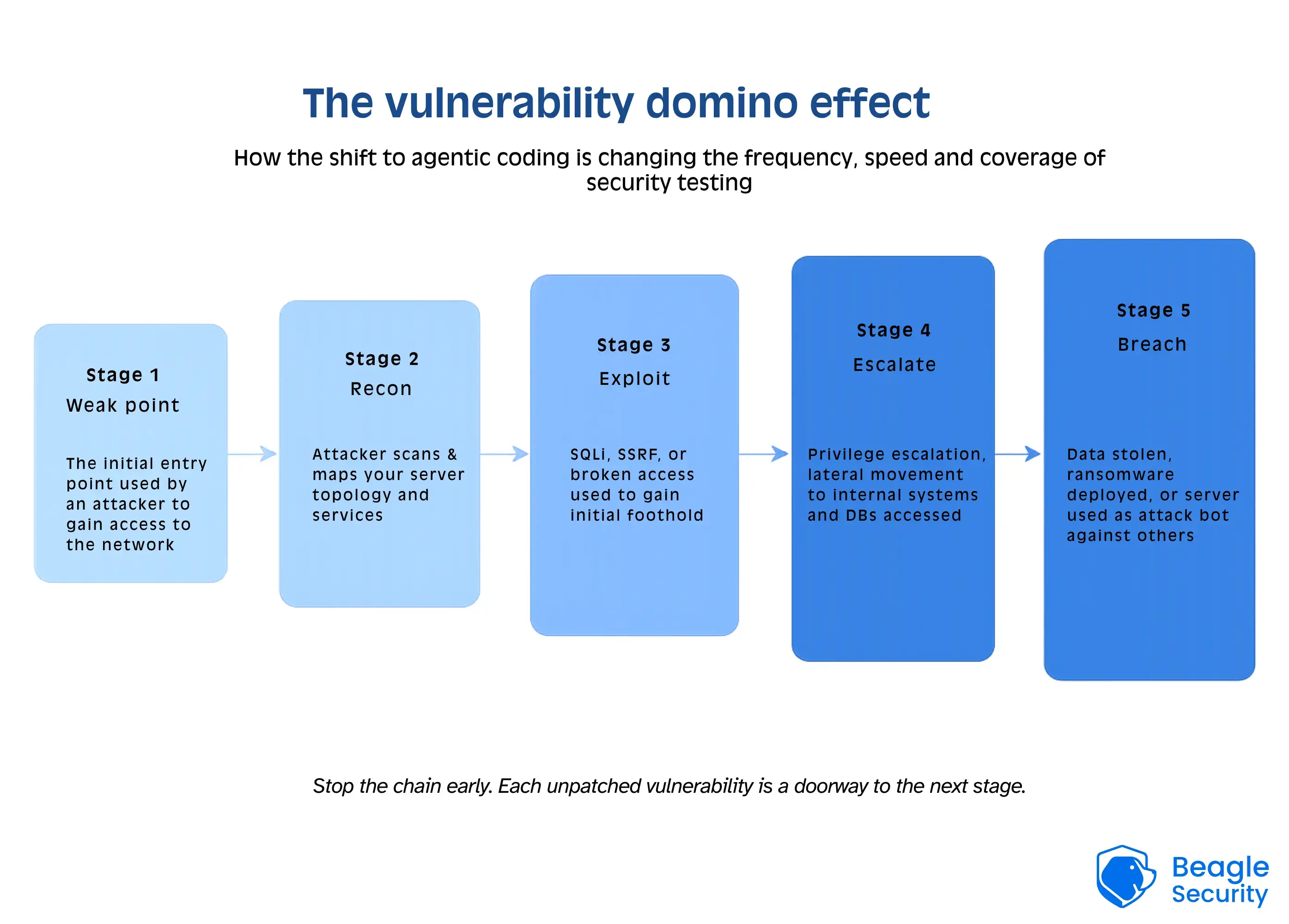
Understanding what makes web servers vulnerable is the first step toward defending them. Below are some of the most common and high-impact web server vulnerabilities organizations face today.
1. Denial of Service (DoS) Attacks
A DoS attack overwhelms your server with excessive traffic or resource requests, making it unavailable to legitimate users.
Attackers may use botnets (in Distributed DoS or DDoS) to flood your network, exhaust system resources, or exploit protocol-level weaknesses.
Prevention tips:
Deploy rate limiting and traffic filtering.
Use a Content Delivery Network (CDN) for load balancing.
Implement real-time DDoS protection with automated mitigation systems.
2. SQL injection (SQLi)
SQL Injection exploits insecure database queries to manipulate backend databases. If input validation is weak, attackers can inject malicious code into SQL statements, gaining unauthorized access to sensitive data.
Prevention tips:
Use parameterized queries and prepared statements.
Regularly scan for injection vulnerabilities using DAST tools.
Employ input sanitization to block malicious payloads.
3. Broken Access Control (BAC)
Broken access control occurs when restrictions on authenticated users aren’t enforced correctly, allowing attackers to access unauthorized data or functionality.
Examples include privilege escalation, directory traversal, and insecure direct object references.
Prevention tips:
Implement role-based access control (RBAC).
Use least privilege principles for all accounts.
Conduct authorization testing during penetration assessments.
4. Server-Side Request Forgery (SSRF)
SSRF vulnerabilities allow attackers to manipulate a web server to make unintended requests to internal or external systems. These attacks can expose internal APIs, metadata services, or sensitive files.
Prevention tips:
Validate and sanitize all user-provided URLs.
Restrict outbound requests from the web server.
Use allowlists for approved endpoints.
Best practices for web server security
Implementing best practices for web server security requires a proactive, layered approach. Below are essential measures every organization should adopt in 2025:
1. Keep your server software updated
Regularly update web servers, frameworks, and dependencies to patch known vulnerabilities.
Automate updates where possible but validate critical patches in staging environments first.
2. Enforce HTTPS and secure configurations
Always use TLS 1.3 or higher for encrypted communication.
Disable outdated protocols like SSLv3 and weak ciphers.
Redirect all HTTP traffic to HTTPS automatically.
3. Implement strong authentication and access control
Use multi-factor authentication (MFA) for admin access.
Limit administrative privileges and monitor all access logs.
Employ just-in-time (JIT) access for critical systems.
4. Regularly scan and test for vulnerabilities
Conduct web server vulnerability assessments using automated tools.
Supplement scanning with manual penetration testing for deeper insights.
Prioritize remediation of high-severity findings based on CVSS scores.
5. Harden server configurations
Disable directory listing and remove unused modules or services.
Use security headers such as Content-Security-Policy and X-Frame-Options.
Separate environments (development, testing, production) to minimize risk exposure.
6. Monitor logs and set up intrusion detection
Centralize log management using tools like ELK Stack or Splunk.
Deploy intrusion detection systems (IDS) to identify anomalies early.
Automate alerting for suspicious IPs, repeated failed logins, or unusual activity.
7. Backup and disaster recovery
Implement regular automated backups of critical server data.
Store backups offsite or in secure cloud storage.
Test recovery procedures periodically to ensure reliability.
By following these web server security best practices, organizations can significantly reduce their attack surface and improve resilience against evolving threats.
Web server security checklist
Here is a quick checklist to make sure your web security stays updated and air-tight.
| Category | Action item | Status |
|---|---|---|
| System and OS security | Keep your operating system and server software updated | |
| Disable unused services and ports | ||
| Use strong passwords or SSH keys | ||
| Disable root login via SSH | ||
| Restrict access to config and log files | ||
| Automate patch management where possible | ||
| Network and access control | Allow only necessary traffic through firewalls | |
| Use a web application firewall (WAF) | ||
| Limit admin panel access to trusted IPs | ||
| Enable intrusion detection or prevention tools | ||
| HTTPS and TLS configuration | Enforce HTTPS on all pages | |
| Disable old SSL/TLS versions | ||
| Use strong ciphers and keys | ||
| Enable HSTS headers | ||
| Keep SSL certificates valid and updated | ||
| Server configuration | Remove default admin accounts | |
| Disable directory listing | ||
| Set correct file permissions | ||
| Hide server version and banner info | ||
| Remove unused modules or plugins | ||
| Application and database security | Keep CMS, frameworks, and plugins updated | |
| Use secure, rotated database credentials | ||
| Limit database access to specific IPs | ||
| Validate and sanitize user inputs | ||
| Monitoring and maintenance | Enable and review server logs regularly | |
| Run vulnerability scans or pen tests | ||
| Back up data and configs securely | ||
| Review security settings periodically |
Top web server security tools
Choosing the right tools can greatly enhance your web server security strategy. Below are five leading solutions in 2025 that help automate detection, prevention, and monitoring efforts.
1. Beagle Security
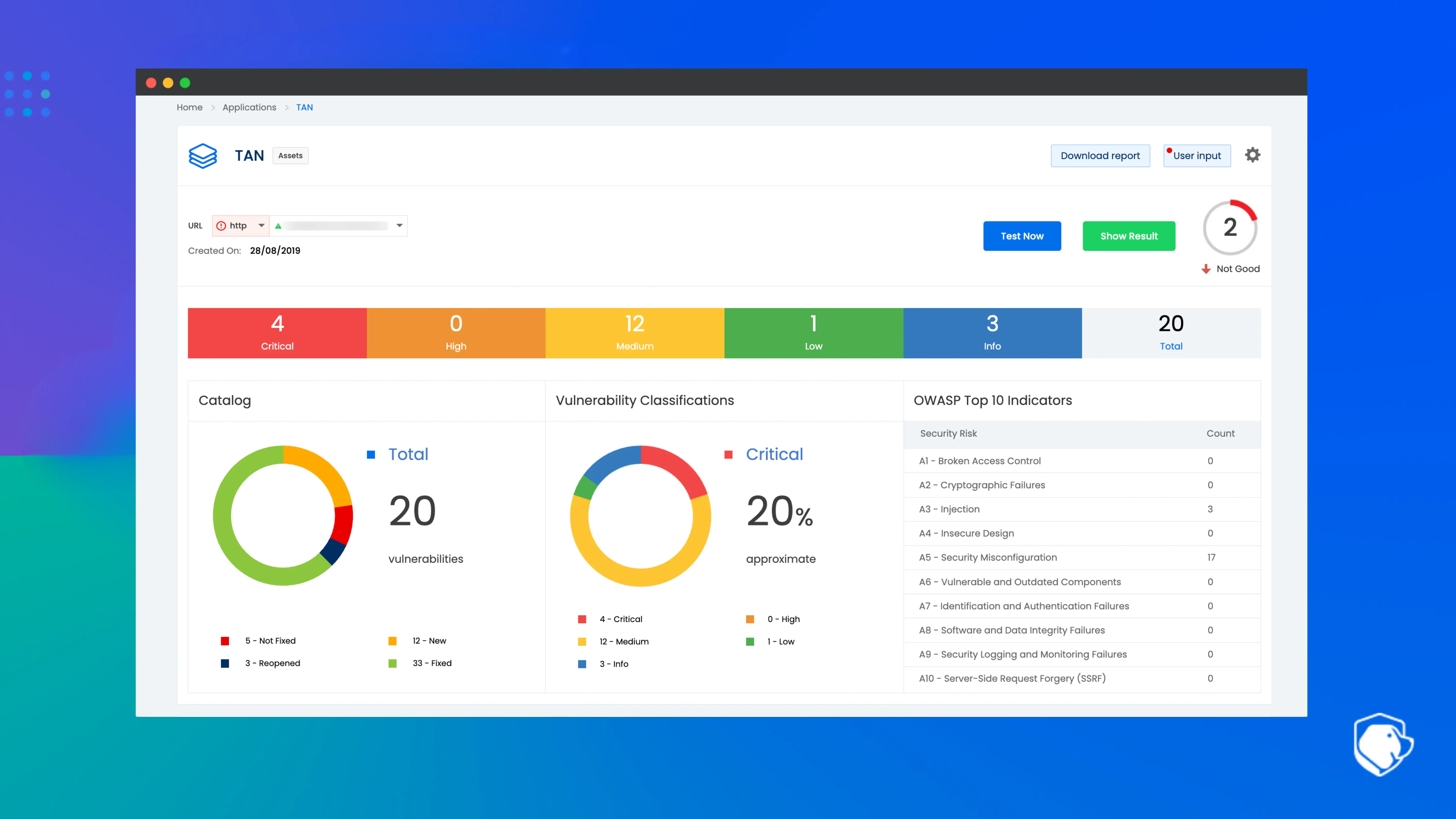
Beagle Security is an AI-powered application security platform focused on automating web and web server vulnerability assessment within CI/CD pipelines. It helps teams identify, prioritize and remediate vulnerabilities across their web applications and infrastructure, reducing false positives and integrating with bug-tracking and development workflows.
Features:
Automates complex penetration testing workflows
Integrates with bug-tracking and CI/CD tools
Applies AI logic to prioritize vulnerabilities
Supports web application and web server assessments
Reduces false positives through intelligent filtering
Why it stands out: Its continuous testing and real-time dashboards make it ideal for security teams seeking actionable insights into web server security posture.
2. Snort
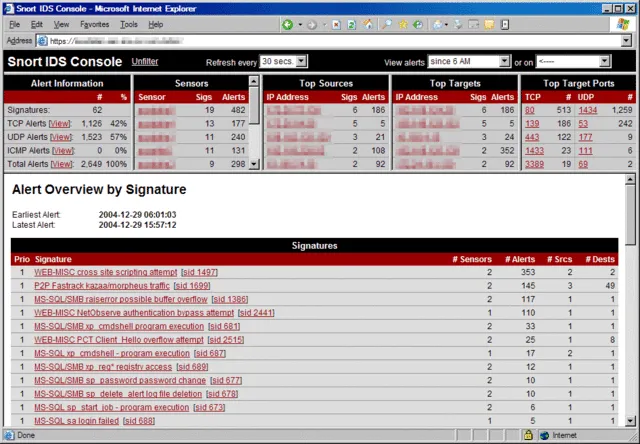
Snort is a widely adopted open-source network intrusion detection and prevention system (IDS/IPS) that monitors network traffic in real time, uses rule-based signatures and anomaly logic to identify malicious packets, and can log, alert or block suspicious activity.
Features:
Real-time traffic monitoring across networks
Packet logging for later analysis
Protocol analysis and content matching
OS fingerprinting of network hosts
Open-source rules-based detection engine
Why it’s useful: Perfect for detecting suspicious traffic targeting web servers and mitigating threats in real time.
3. Metasploit Framework
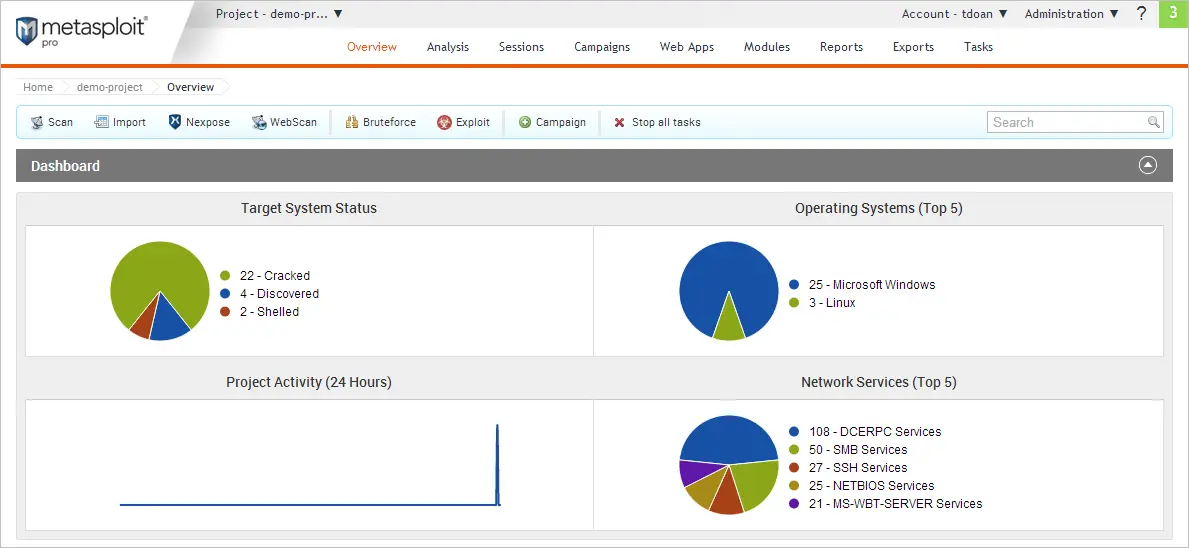
Metasploit is a powerful open-source penetration testing framework that enables security professionals to identify, exploit and validate vulnerabilities in systems. It provides a modular environment where exploits, payloads, and auxiliary tools can be combined to simulate real-world attacks and assess defenses.
Features:
Large exploit database for many platforms
Payload generation and delivery capabilities
Post-exploitation modules for deeper access
Integration with vulnerability scanners and network data
Modular architecture for custom attack scenarios
Why it’s useful: Helps simulate realistic attacks and evaluate the effectiveness of your web server security controls.
4. Nmap
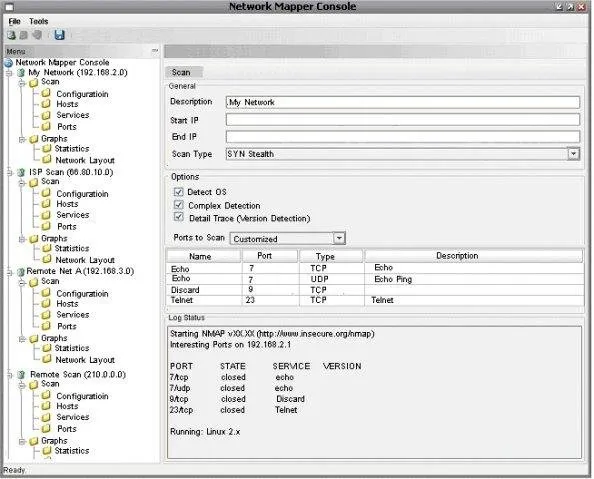
Nmap (“Network Mapper”) is a versatile open-source tool for network discovery, security auditing and asset inventory. It allows administrators and testers to scan hosts, identify open ports and services, detect operating systems, and assess potential network vulnerabilities or misconfigurations.
Features:
Host discovery across networks and sub-nets
Port scanning to enumerate open services
Service and version detection for running software
OS fingerprinting of target devices
Scripting engine (NSE) for advanced custom scans
Why it’s useful: Offers visibility into your server’s attack surface, helping teams close unnecessary entry points.
5. OpenVAS
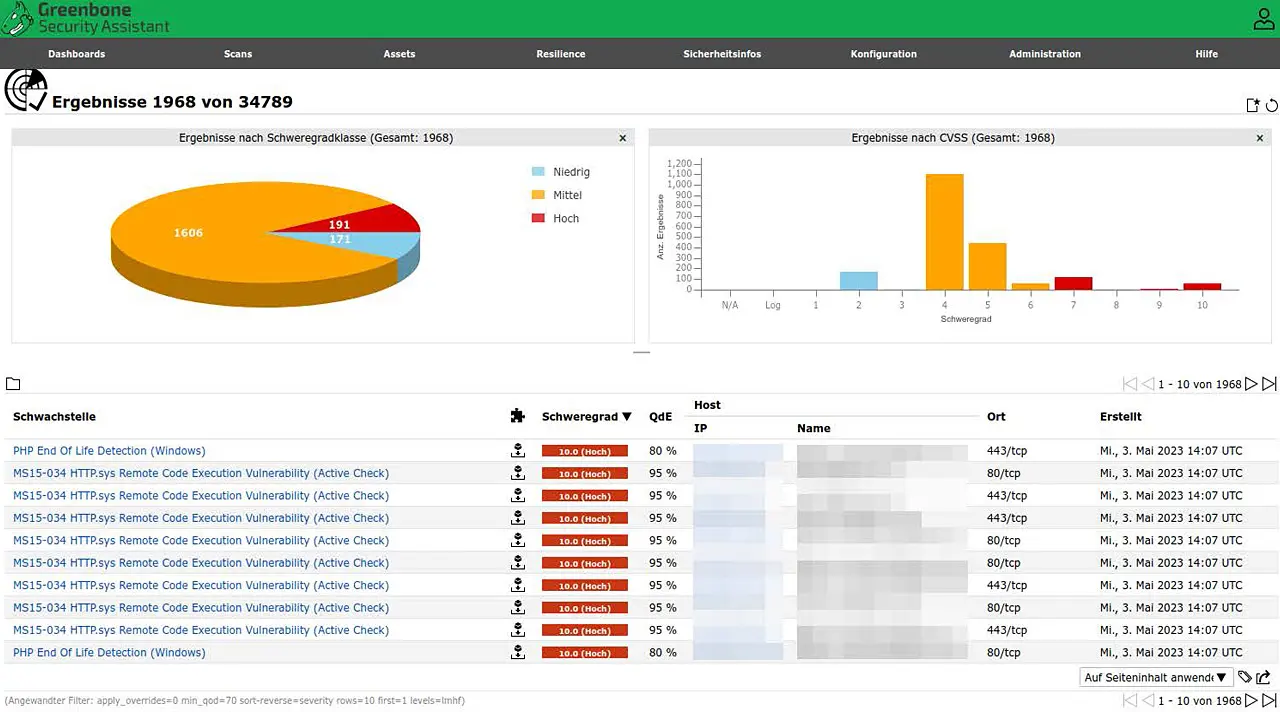
OpenVAS (Open Vulnerability Assessment Scanner) is a full-featured open-source vulnerability scanning and management tool that supports both unauthenticated and authenticated testing across network devices, web servers and systems. It includes a continually updated feed of vulnerability tests and supports large-scale scanning operations.
Features:
Extensive vulnerability test database (NVT feed)
Authenticated and unauthenticated scanning modes
Scalable scanning for large-scale infrastructure
Detailed reporting of vulnerabilities and remediation suggestions
Support for custom scanning policies and protocols
Why it’s useful: Ideal for regular assessments and compliance reporting in enterprise environments.
Final thoughts
Ensuring web server security requires more than reactive patching: it demands continuous testing, proactive defense, and intelligent automation.
A single misconfiguration or unpatched vulnerability can expose your entire organization to breaches, downtime, and reputational damage. That’s why combining best practices, robust tools, and periodic penetration testing remains crucial.
If you’re looking to elevate your web server security posture, consider integrating platforms like Beagle Security for continuous, AI-driven assessments. Check out our 14-day advanced trial or try our interactive demo to see if we’re the right fit for you.
Remember that regular testing not only helps identify vulnerabilities but also validates the strength of your defenses.
FAQ
How can I secure my web server?
You can secure your web server by regularly updating software, using strong authentication, enabling HTTPS, configuring firewalls, and running vulnerability assessments with tools like Beagle Security, Snort, or OpenVAS.
Implementing least privilege access and continuous monitoring further helps prevent unauthorized attacks.
How often should I verify my web server security?
You should verify your web server security at least once every quarter or after any major system updates, configuration changes, or new deployments.
Frequent penetration testing and automated scans help identify emerging vulnerabilities before attackers can exploit them.
What are the common web server issues?
Common web server issues include unpatched software, weak configurations, open ports, outdated SSL/TLS protocols, and poor access control.
These weaknesses can lead to performance degradation, data leaks, and security breaches if not regularly audited.


![Top ZAP alternatives and competitors [October 2026]](/blog/images/top-zap-alternatives-cover.webp "Top ZAP alternatives and competitors [October 2026]")





![Top 10 penetration testing companies [2026]](/blog/images/top-penetration-testing-companies-cover.webp "Top 10 penetration testing companies [2026]")




![Top vendor application security tools [2026]](/blog/images/top-vendor-application-security-testing-tools-2026-cover.webp "Top vendor application security tools [2026]")





![Top Snyk alternatives & competitors [2026]](/blog/images/top-snyk-alternatives-cover.webp "Top Snyk alternatives & competitors [2026]")