
Most security teams have automated scanning in place. They catch SQL injection, XSS, SSRF, and a long list of known vulnerability classes with reasonable consistency. But there is a category of vulnerability that scanners are structurally unable to find, not because the tools are poorly configured, but because the flaws have no signature to scan for.
Business logic vulnerabilities don’t come from coding mistakes. They come from flawed assumptions about how users will interact with an application. The code works exactly as written. The problem is that what it was written to do leaves gaps in checkout flows, authentication sequences, access control paths, and multi-step API workflows that an attacker can exploit without ever sending a malicious payload. These flaws look like normal user behavior to a scanner, which is exactly why they go undetected.
In this blog, we’ll break down what business logic vulnerabilities are, why they’re so consistently missed, and how to test for them effectively with Beagle Security.
What is a business logic vulnerability?
Business logic vulnerabilities are security flaws that occur in the unique workflows and core logic of an application. Unlike standard technical bugs (like SQL injection or XSS), these vulnerabilities are tied to the specific way a business process is designed and implemented, meaning they represent a disconnect between how the application is intended to function and how it actually behaves when manipulated
This distinction matters. A SQL injection flaw exists because a developer wrote unsafe code. A business logic flaw exists because a developer made a flawed assumption about how users would behave and nothing in the system corrects that assumption when an attacker violates it.
These vulnerabilities are inherently application-specific. A flaw in a discount redemption flow has nothing structurally in common with a rate-limit bypass on an API. Both are logical flaws. Neither resembles the other. That specificity is also what makes them so difficult to detect: there is no universal signature, no known pattern to scan for, no payload to test against.
They are also invisible during normal use. Legitimate users don’t stumble into them. Attackers find them by asking a simple question: what happens when I don’t follow the rules the application assumed I would?
How business logic vulnerabilities arise
Logic vulnerabilities cluster around predictable failure points in application design. The patterns below are recognizable to most AppSec teams, because they see them repeatedly.
Implicit trust in user-controlled inputs
Applications are built on assumptions about how users will interact with them. When those assumptions aren’t enforced server-side, they become vulnerabilities.
A developer who assumes a price field will always contain a positive number may not validate that assumption on the backend. An attacker using an intercepting proxy never touches the UI. They modify the POST request directly, submit a negative quantity, and receive a credit instead of a charge. Price fields, quantity values, user role identifiers, and discount codes are common targets for exactly this reason.
Gaps between design and implementation
Security decisions made during architecture don’t always survive contact with the codebase. An architect designs a multi-step workflow where each step validates the previous one. A developer working on a later step assumes the earlier one already handled validation and skips it. Neither made a catastrophic error. The gap between their assumptions is where the vulnerability lives.
These gaps are especially common in large codebases where no single developer holds a complete model of the system’s intended behavior.
Workflow sequencing flaws
Many applications depend on users completing steps in a defined order: account creation, email verification, payment, confirmation. The assumption is that step B follows step A. The problem is that nothing always enforces that sequence at the server level.
Forced browsing, submitting a direct request to a later-stage URL, tests whether the application validates that prior steps were completed, or simply responds because the request was valid. Skipping a payment step to reach an order confirmation page is a prime example.
Privilege and access assumption errors
Logic that grants elevated access based on incomplete checks is a recurring source of these flaws. An application might verify a user’s role at login but not at the point of action. A free-tier user might be able to access a paid API endpoint simply by knowing the path, because the access check only runs at the account level, not at the endpoint level.
These flaws are often only visible when testing edge cases that QA teams never think to probe.
Business logic vulnerability examples
Business logic flaws take different forms depending on the application. These are the patterns that appear most consistently across real systems.
Price and quantity manipulation
An e-commerce platform applies a discount when a cart total exceeds a threshold. A user adds items to qualify, the discount is applied, then removes items but the discount remains because the platform doesn’t revalidate it after cart changes. The discounted price persists on an order that never met the original criteria.
A related pattern: submitting a negative quantity. If the server doesn’t enforce that quantities must be positive integers, ordering 1 unit may generate a credit rather than a charge.
Coupon and discount replay via race conditions
A well-documented example: a discount redemption endpoint was called 30 times in parallel using concurrent requests. Because the server checked availability before any single request had time to mark the discount as used, each call succeeded resulting in significantly more discount than was ever intended. This is a race condition at the application logic layer, not a coding error in the traditional sense.
Workflow step skipping
In a multi-step checkout, payment is expected before order confirmation. If the confirmation endpoint verifies only that the user has a valid session not that payment was processed an attacker can skip directly to confirmation. The authentication check passed. The workflow logic did not.
Privilege escalation via parameter tampering
An application stores a user’s role in a cookie or local storage and sends it with each request. If the server trusts the client’s claim rather than verifying it independently, changing role=user to role=admin in the request may produce admin-level responses. The authentication layer worked correctly. The authorization logic trusted the wrong source.
Free-tier access to paid API endpoints
A SaaS platform restricts certain endpoints to paid plans via the UI. The underlying API doesn’t validate the subscription tier before responding. A free-tier user who knows the endpoint path accesses paid functionality directly. The front-end enforced the restriction. The back-end never did.
Why automated scanners miss business logic vulnerabilities
Scanners are built around known vulnerability signatures. They look for patterns that match a database of established issues like SQLi, XSS, XXE, SSRF. Business logic flaws have no signature because they’re specific to the application. A scanner doesn’t know that a coupon should only be applied once, or that step 3 of your checkout should always follow step 2, or that a free-tier user shouldn’t be able to access a paid API endpoint. That knowledge doesn’t exist in any signature database. It exists only in the context of your application.
Signature-based detection has a ceiling
Pattern matching works well for technical vulnerability classes because the flaw looks the same regardless of which application it appears in. A SQL injection payload produces a recognizable response. An XSS string behaves predictably. Scanners are designed around this consistency.
Business logic flaws have no such consistency. Every application’s rules and workflows are unique. A scanner cannot flag a request as malicious if it is technically well-formed even if it violates a business rule the scanner has no way of knowing it exists. There is no universal template for a logic flaw, which means there is no signature to scan for.
Scanners don’t understand application context
A scanner sees HTTP requests and responses. It doesn’t understand what a valid user journey looks like, what state transitions are permitted, or what business rules the application is supposed to enforce.
Without that context, a scanner cannot detect when a user has bypassed a mandatory step, skipping payment to reach order confirmation, for example. The request is valid. The response is normal. Only someone who understands the intended flow would recognize that something went wrong.
Unauthenticated scans miss the most critical flows
The majority of business logic flaws exist behind login screens in multi-step workflows, role-based access paths, and authenticated API calls. A scanner that can’t test authenticated flows won’t find them.
Even scanners configured with valid credentials typically can’t reason about workflow sequence. They replay individual requests. They can’t evaluate whether skipping a step or repeating one produces an exploitable state. Finding that requires understanding what the application is supposed to do, not just what it returns.
How to test for business logic vulnerabilities
1. Map the application’s intended workflows first
You can’t find logic flaws without understanding correct behavior.
Document key user journeys:
Purchase flows
Authentication flows
Role-based access paths
API call sequences
2. Test every assumption the application makes about user behavior
For each workflow, identify assumptions like:
Users complete steps in order
Users cannot modify server-side values
Users cannot access other accounts
Then test each one deliberately.
3. Focus on state, sequence, and trust
These are where most logic flaws happen. Test:
Skipping steps
Repeating steps
Manipulating state between steps
Accessing endpoints out of sequence
4. Use authenticated testing tools
Testing behind login is essential.
Document authenticated flows
Test the full application surface
Don’t limit to public endpoints
5. Combine automated testing with manual review
Automated tools catch hidden logic issues
Manual review identifies context-specific flaws
You need both for full coverage
Testing for business logic vulnerabilities with Beagle Security
This section walks you through the setup required to test for business logic vulnerabilities using Beagle Security. By configuring authentication and user flows, you can simulate real-world behavior and uncover logic flaws across the application.
Step 1: Login and add your application
Click Add Application on the Beagle Security dashboard. Provide the required details:
Application name
Base URL or primary domain
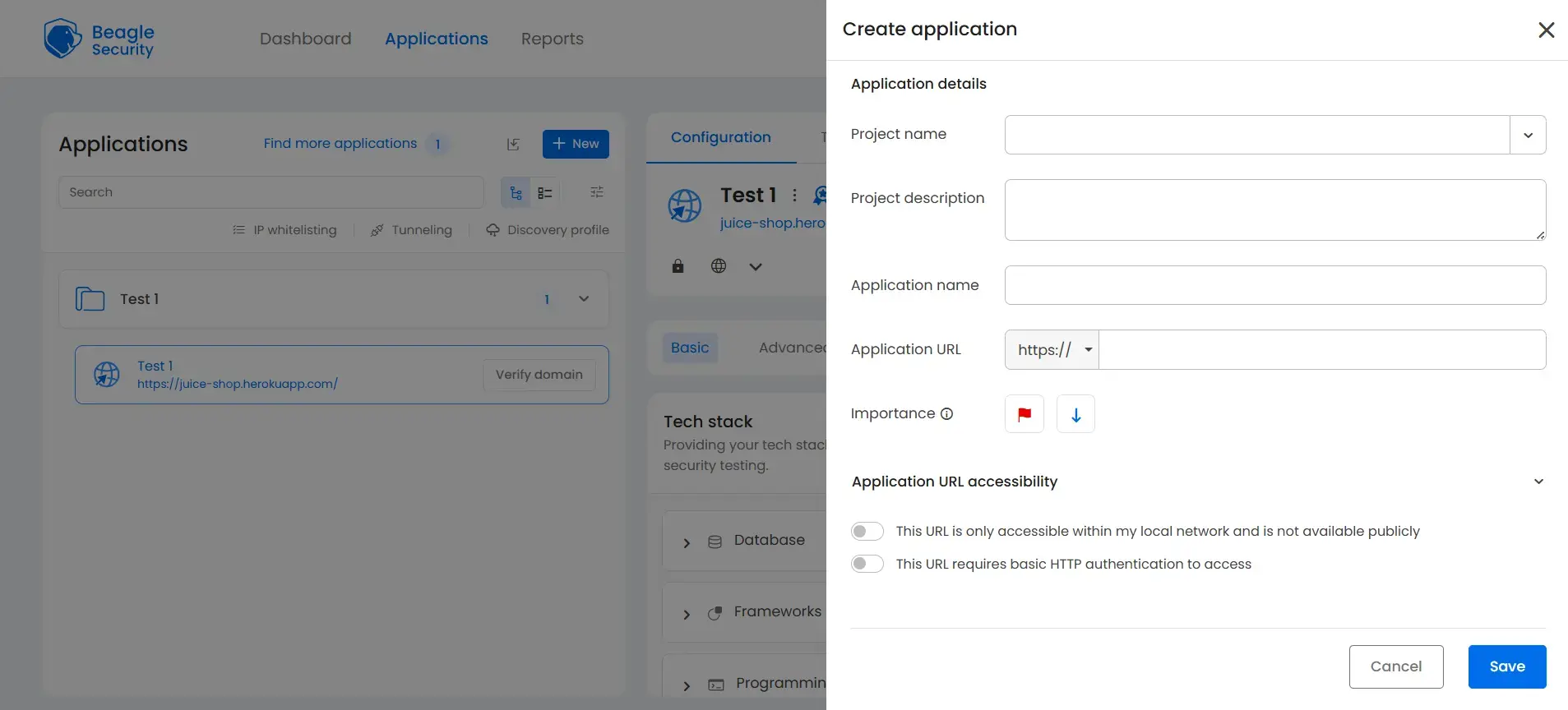
(Dashboard → New → fill in project name & description, application name & URL)
Step 2: Verify your domain
Prove ownership before Beagle Security can test your application
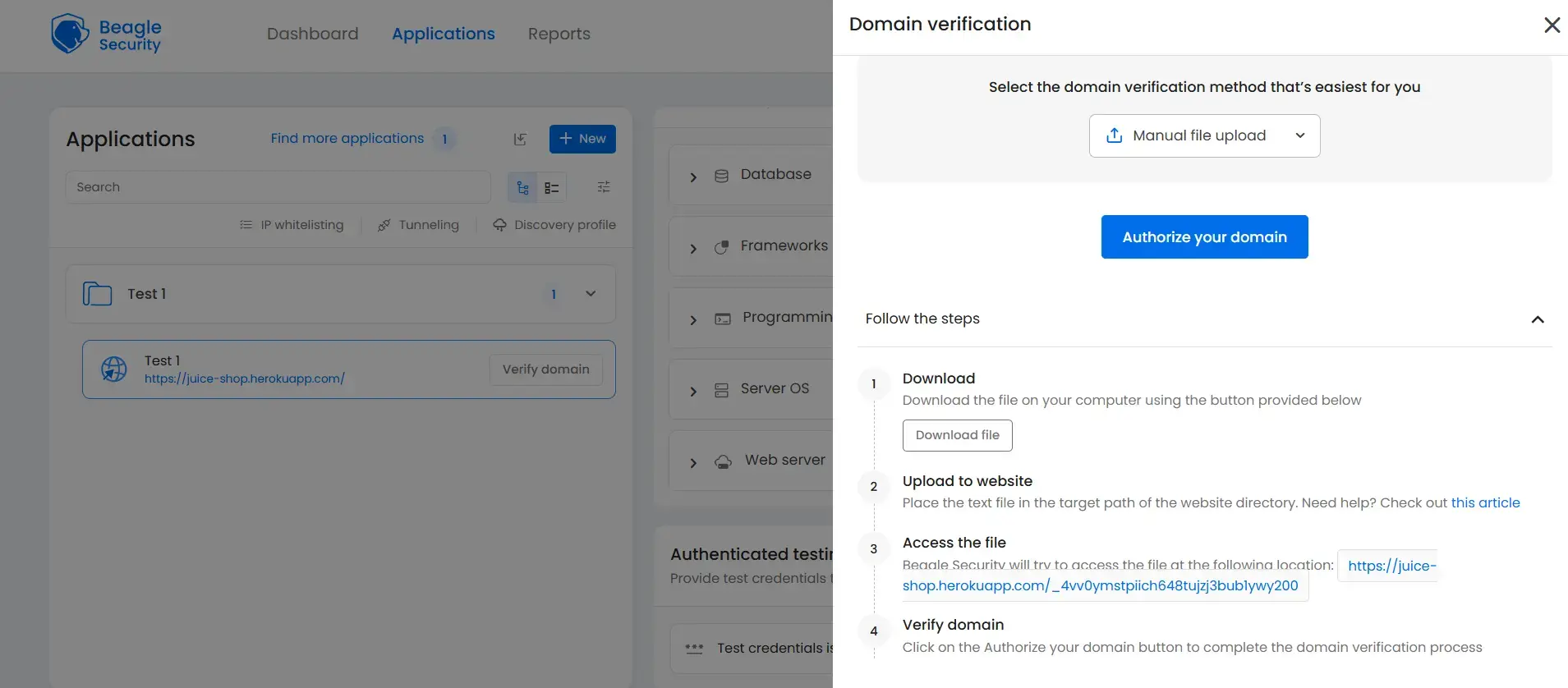
Verify ownership by uploading a verification file, adding a DNS TXT record, inserting an HTML meta tag, or using the WordPress plugin if applicable.
Step 3: Configure scenario recording
Navigate to the advanced tab in your application settings.
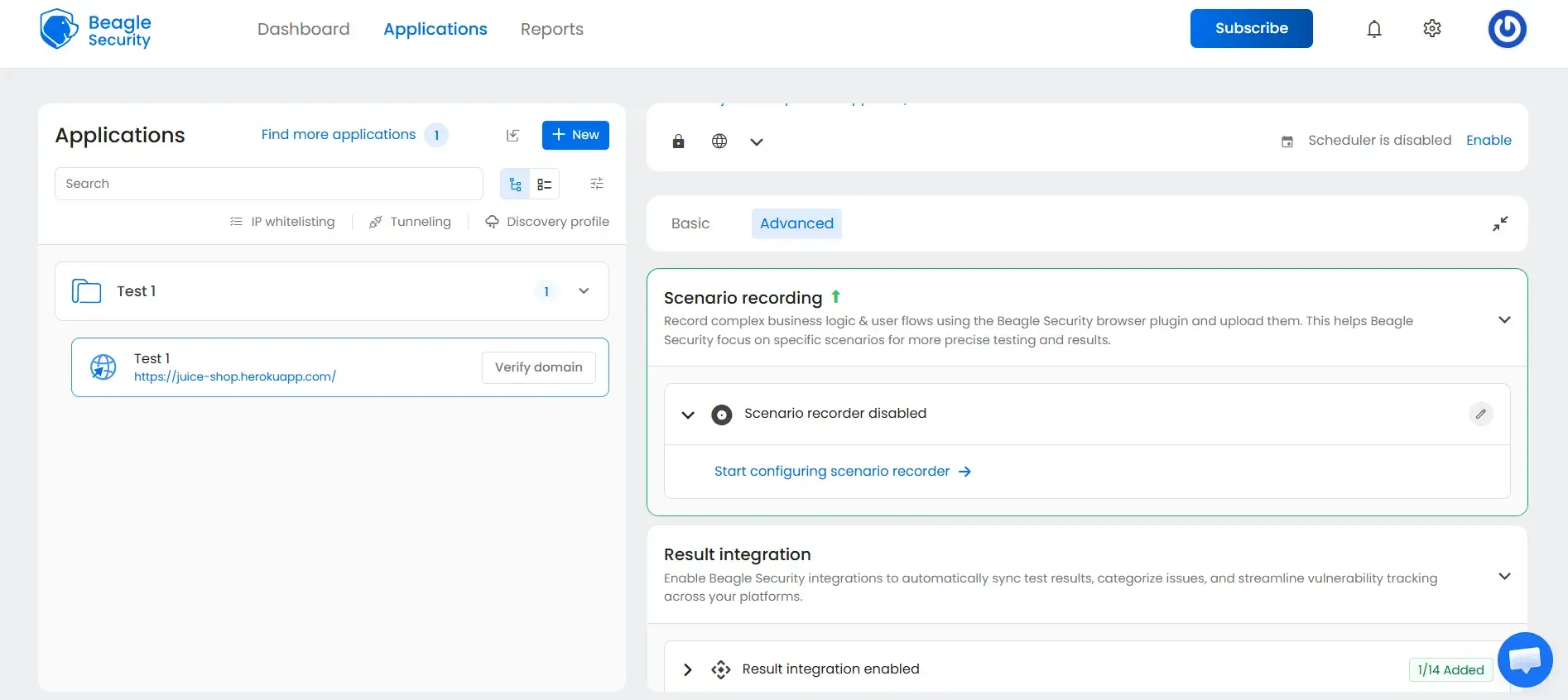
Under the Scenario Recording section, click “Start configuring scenario recorder” to set up and record complex business logic and user flows.
Step 4: Install the Beagle Sequence Recorder extension
Download it using the link: Beagle Sequence Recorder
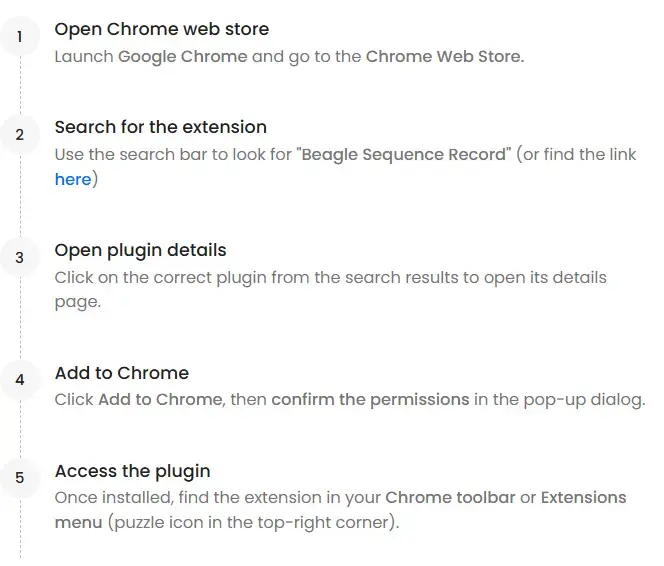
Open the Chrome Web Store
Search for “Beagle Sequence Recorder”
Select the correct extension from the results
Click Add to Chrome and confirm permissions
Access it from the Chrome toolbar
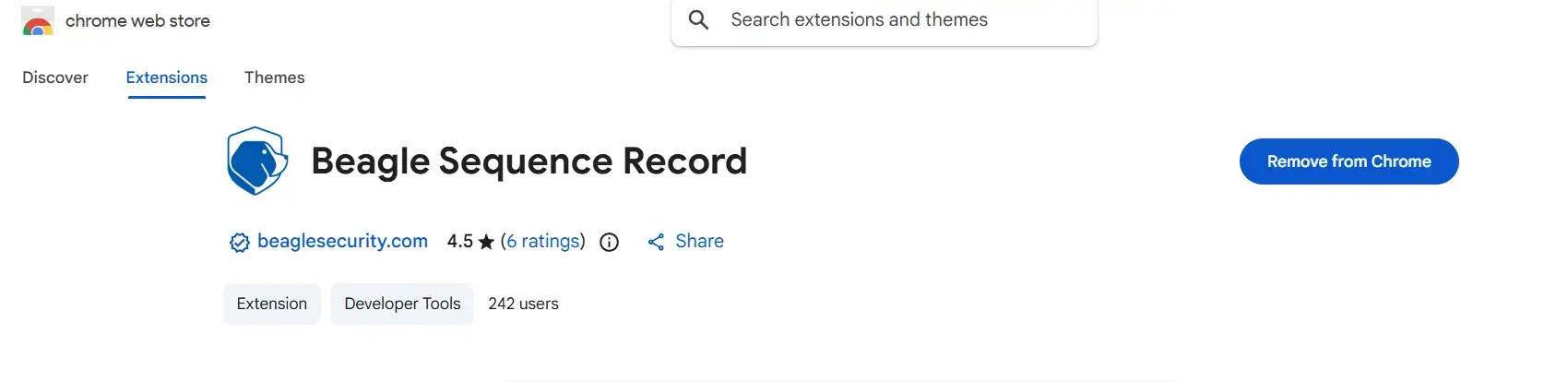
Step 5: Generate access tokens
Beagle Security generates a Personal Access Token and an Application Token, copy both of these for use in the Beagle Sequence Recorder.
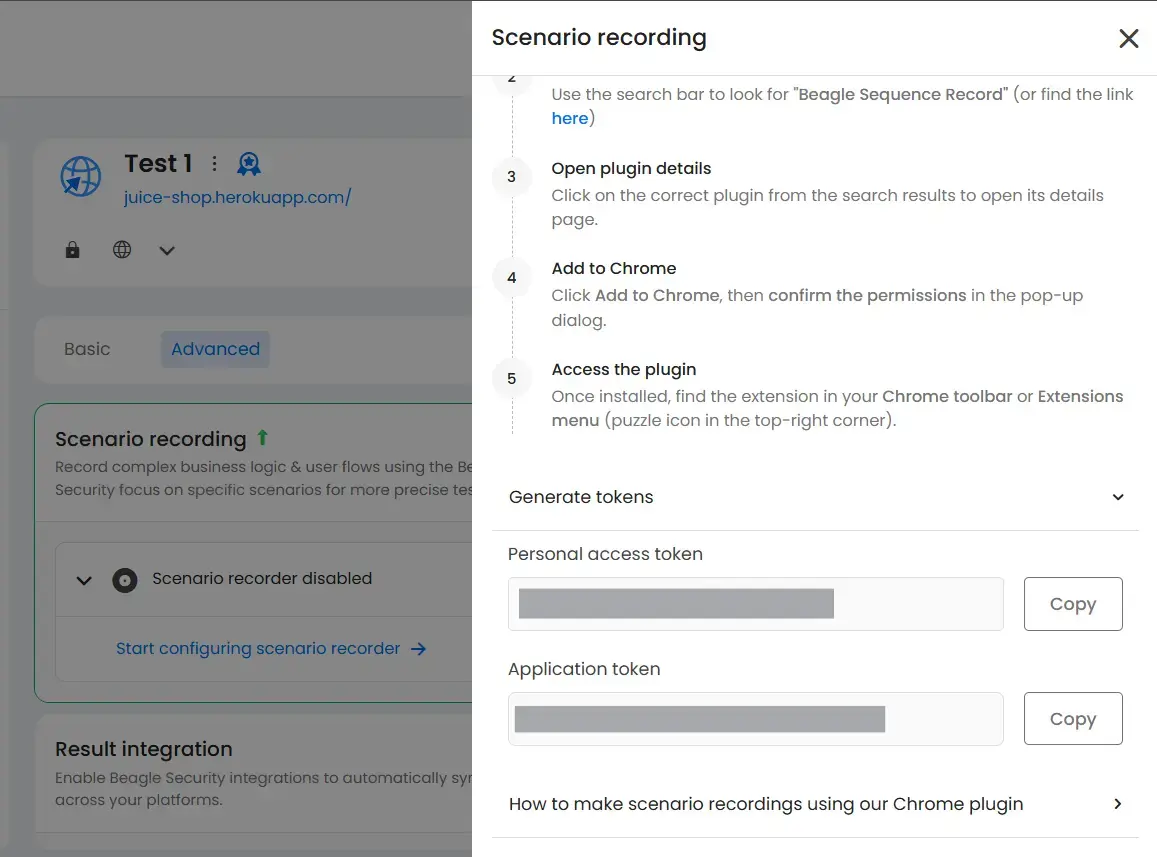
Step 6: Record your login flow
Open the Beagle Sequence Recorder: paste your Personal Access Token and Application Token, choose your sequence type.
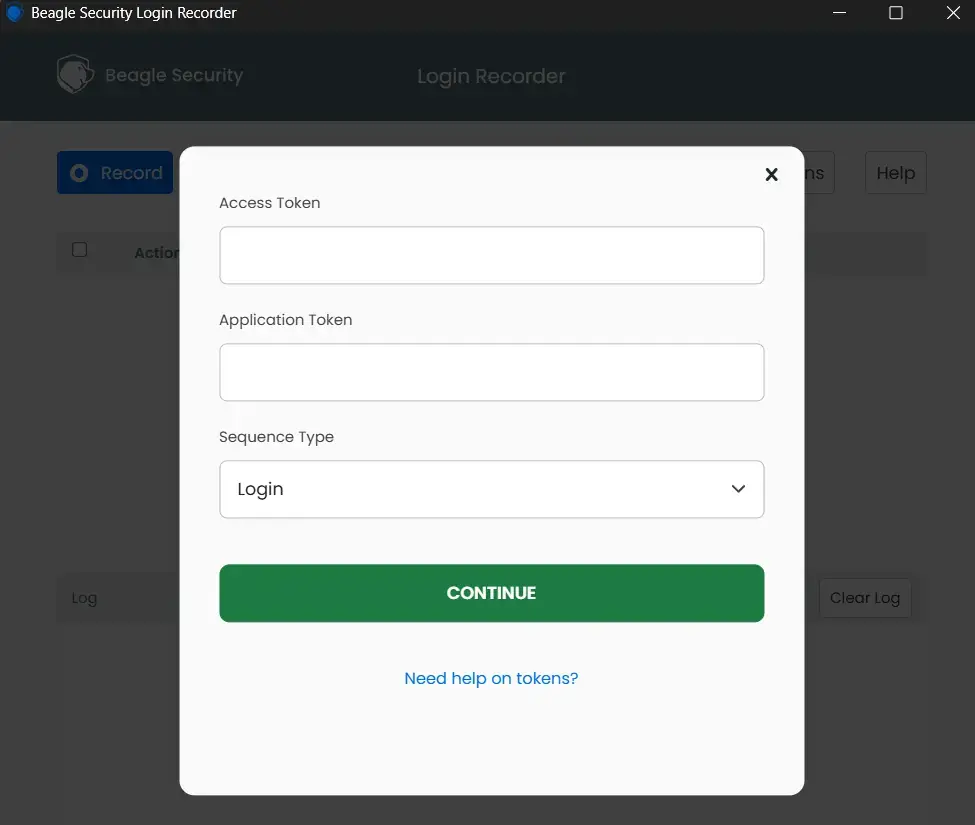
Step 7: Interact with the application and record actions
Once the recorder is active, record the user flow you want to test while Beagle captures each interaction.
Start the Beagle Sequence Recorder extension
Perform the login and navigate through the application like a real user
Click buttons, fill forms, and move across pages as part of the flow you want to test
The recorder automatically captures each action
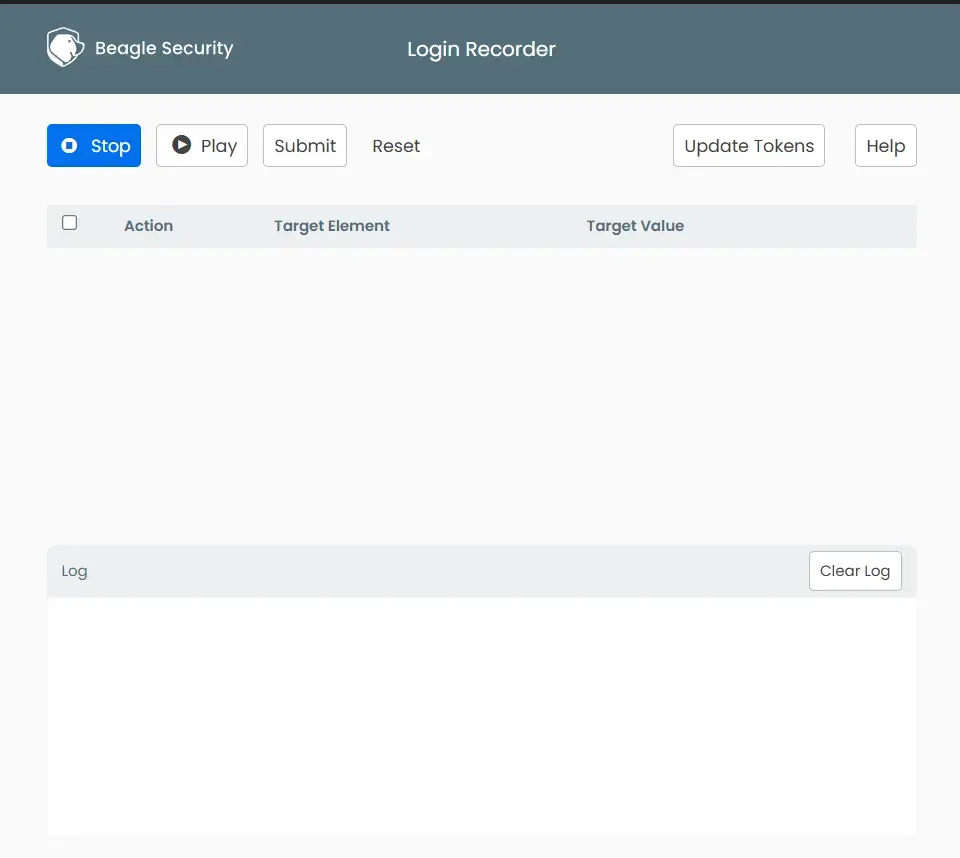
Step 8: Add recording and initiate the test
- Click Submit in the recorder
- Enter the required details:
- Recording title
- User type (e.g., admin, standard user)
- Description
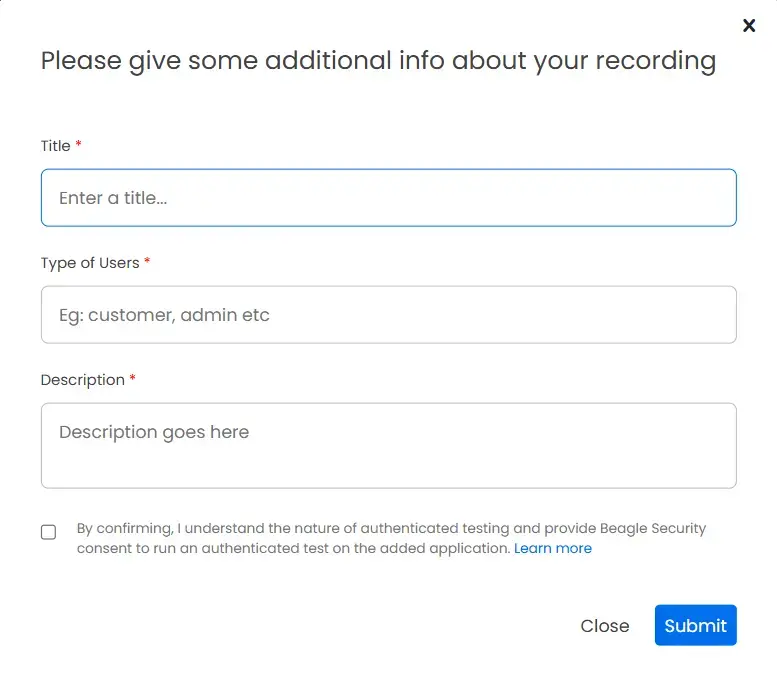

- Submit to start the test
Final thoughts
Business logic vulnerabilities are no longer edge cases, they’re a core security concern in modern applications. As applications become more workflow-driven and API-heavy, the risk shifts from isolated vulnerabilities to flaws in how features are designed and used. These issues don’t break the system, they quietly bypass the rules it was built on.
Testing for them requires more than automated scans. It involves understanding how your application is supposed to function, validating assumptions around user behavior, and testing across real workflows, especially within authenticated areas where most logic flaws exist.
Using tools like Beagle Security can help support this approach by enabling authenticated testing and capturing real user flows, making it easier to evaluate how your application behaves under real-world conditions.
FAQs
What are business logic vulnerabilities?
Business logic vulnerabilities are security flaws that arise from gaps in how an application’s rules and workflows are designed or enforced. Unlike technical vulnerabilities such as SQL injection or XSS, they don’t result from coding errors, they result from flawed assumptions about how users will interact with the application. Because the code often works exactly as written, these flaws are invisible to automated scanners and require context-aware testing to find.
What is business logic testing?
Business logic testing is the process of deliberately probing an application’s workflows, assumptions, and business rules to find flaws that automated scanners miss. It involves mapping intended user journeys, identifying implicit assumptions the application makes about user behavior, and testing what happens when those assumptions are violated by skipping steps, manipulating state, replaying requests, or accessing endpoints out of sequence. Effective business logic testing requires authenticated access and an understanding of how the application is supposed to work.
What is an example of business logic?
Business logic is any rule or workflow that governs how an application operates. Examples include: a coupon can only be applied once per order, a user must complete payment before reaching order confirmation, a free-tier user cannot access paid API endpoints, and an admin action requires a specific role to execute. When these rules are not properly enforced server-side, they become business logic vulnerabilities.


![Top ZAP alternatives and competitors [October 2026]](/blog/images/top-zap-alternatives-cover.webp "Top ZAP alternatives and competitors [October 2026]")




![Top 10 penetration testing companies [2026]](/blog/images/top-penetration-testing-companies-cover.webp "Top 10 penetration testing companies [2026]")




![Top vendor application security tools [2026]](/blog/images/top-vendor-application-security-testing-tools-2026-cover.webp "Top vendor application security tools [2026]")



![Top Snyk alternatives & competitors [2026]](/blog/images/top-snyk-alternatives-cover.webp "Top Snyk alternatives & competitors [2026]")