Internal web application penetration testing: How to test apps that aren’t on the public internet?

Why are internal applications typically left out of security testing?
Most automated security testing tools connect to applications from outside the network. That works when the application is publicly reachable but it breaks the moment the application sits behind a VPN, inside a private subnet, or in a staging environment with no external access.
This is the reason internal applications often get excluded from continuous security testing.
The issue usually is not whether the application can technically be tested. It is whether the scanner can reach it at all.
A cloud-based scanner running somewhere outside your infrastructure cannot directly access an internal admin portal, a Kubernetes service inside a cluster, or a QA environment restricted to internal traffic unless the network explicitly allows it.
So teams end up in an awkward spot. Public applications get scanned continuously because they are reachable. Internal applications, which often handle sensitive workflows and production-like data, quietly fall outside the testing process because they were never designed to be publicly accessible in the first place.
What counts as an internal web application?
Usually, it is any application that cannot be reached from the public internet.
That includes the obvious things like staging and QA environments, but it also covers a lot of systems teams stop thinking about as “web applications” after they move inside private infrastructure. Internal admin portals are a common example. So are dashboards used only by employees, reporting tools, developer platforms, or applications protected behind VPN access or SSO.
For cloud-native teams, this often includes services running inside Kubernetes clusters as internal-only services without external ingress. APIs exposed only to other internal services also fall into the same category.
Sometimes these environments are temporary. Sometimes they were never meant to be externally accessible in the first place. Either way, they still handle application logic, authentication flows, APIs, and sensitive operational access, which means the security risks do not disappear just because the application sits inside a private network.
The tunneling approach: How Beagle Security reaches non public application
This is where something like tunneling solves the problem. Instead of exposing an internal application to the public internet just so a scanner can reach it, the connection is established from inside the environment outward. That allows the scanner to access the application without requiring inbound public access to the application itself.
Beagle Security handles this through Cosmog, which is designed specifically for testing internal web applications and environments that are not publicly reachable.
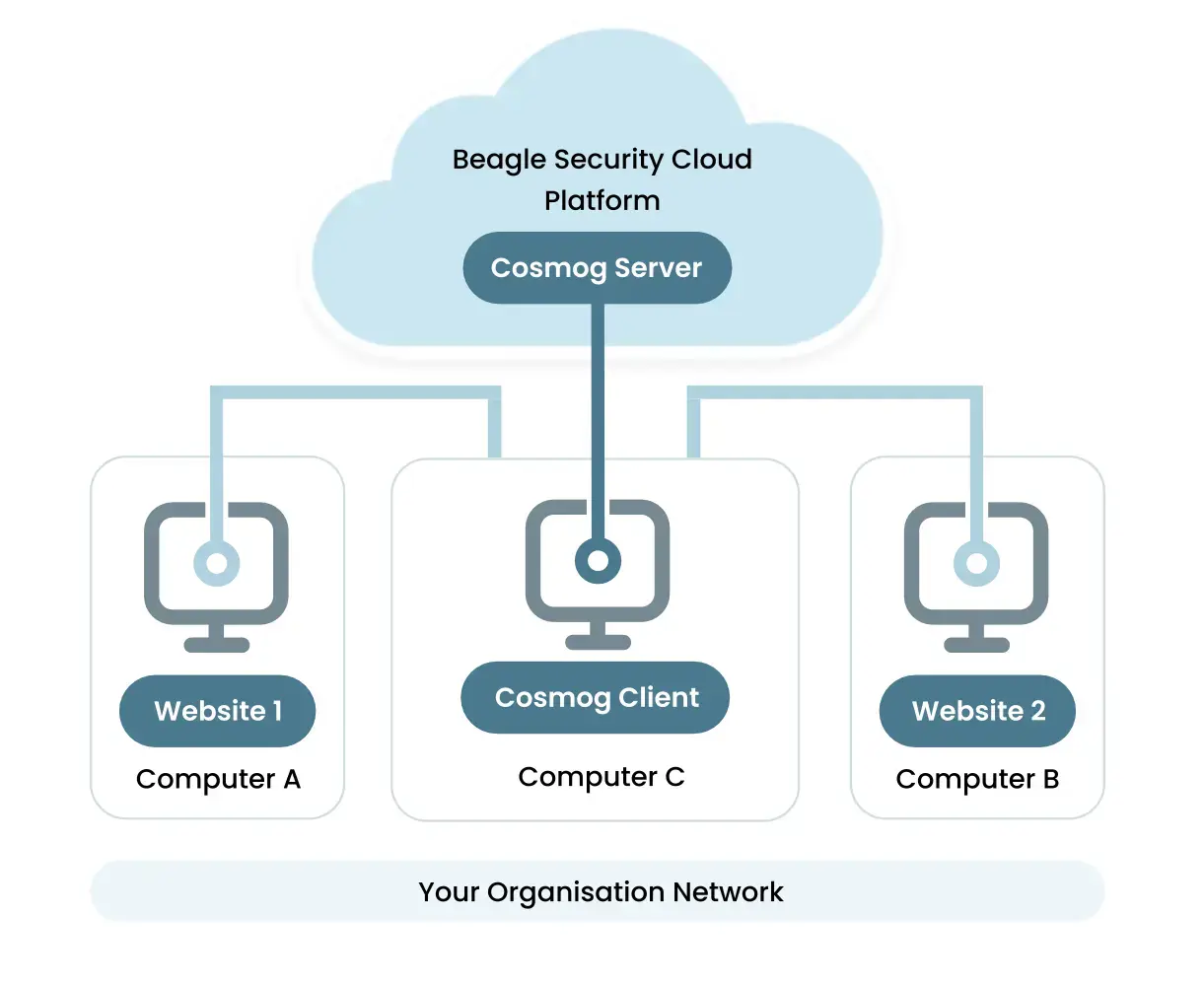
Cosmog runs inside the customer environment and creates a secure outbound connection to Beagle Security. Once the connection is established, the scanner can reach internal applications through that tunnel without opening the application directly to external traffic.
In practice this means teams can test their internal applications like their HR systems, dashboards, etc, without making those systems publicly accessible first.
The important part here is that the application itself stays private. Cosmog handles the connectivity layer needed for the testing platform to interact with the application from inside the environment rather than trying to reach it externally.
Deployment options
Different teams run internal applications in different ways, so Cosmog supports more than one deployment approach depending on the environment.
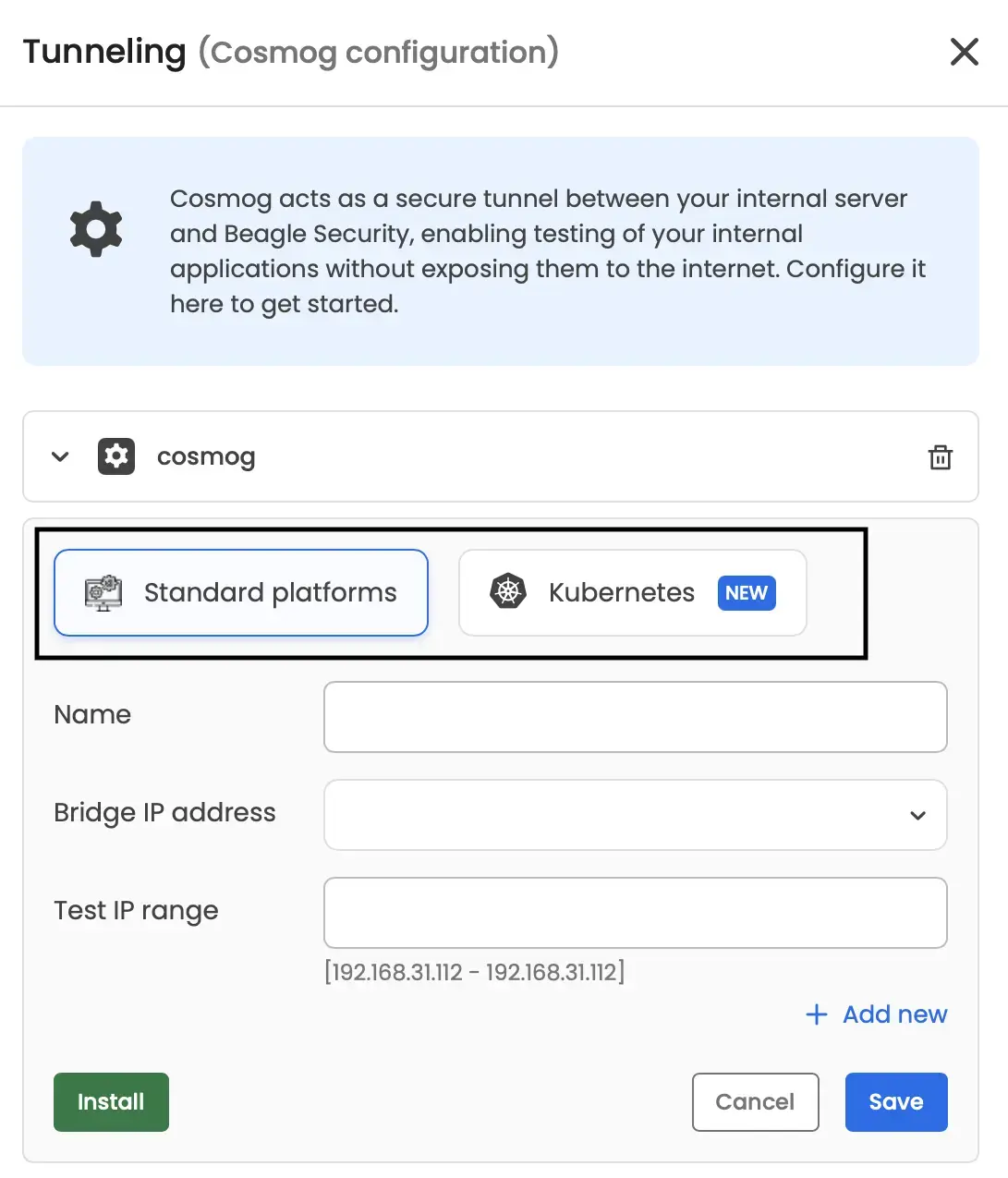
Standard platforms
For teams running applications on traditional infrastructure, virtual machines, or internal servers, Cosmog can be installed directly inside the environment where the application is reachable.
Once installed, it establishes the outbound tunnel needed for Beagle Security to access the application securely for testing. The application itself still stays private and does not need to be exposed publicly.
This setup is usually the simpler option for organizations running:
Internal dashboards
Staging environments
QA servers
VPN gated applications
Internal APIs on standard infrastructure
The full setup for standard platforms is available as a help document in Beagle Security’s help center.
Kubernetes
For cloud-native teams, the setup usually looks a little different.
Applications running as internal Kubernetes services often have no external ingress at all, which means external scanners cannot reach them directly even if the cluster itself is internet-connected.
Cosmog can also be deployed inside Kubernetes clusters so the tunnel originates from within the cluster environment itself. That allows Beagle Security to test internal services, APIs, and applications running as pods or cluster services without exposing them externally.
This deployment path is useful for teams running:
Internal microservices
Cluster-only APIs
Private staging environments inside Kubernetes
Internal admin tooling running as services
The Kubernetes setup is available as a Beagle Security documentation on the help center.
What happens to your data during a scan?
This is often the first question security teams ask once internal application testing enters the conversation. If a scanner is reaching applications inside a private network, teams naturally want to know what data leaves the environment and what gets stored afterward.
With Beagle Security, scan traffic is encrypted both in transit and at rest. Scan payload data generated during testing is not retained permanently and is deleted after the scan process completes. Only the metadata needed for reporting, findings, and scan management remains associated with the scan.
Customer data is also isolated between environments, so scan data from one customer is never exposed to another customer.
For teams operating under stricter security or compliance requirements, details around Beagle Security’s data handling, infrastructure security, and retention practices are covered in its Trust & Security section.
Setting up an internal web application pentest: Step by step
Before setting up the scan, there are a few things worth checking first.
Cosmog itself is lightweight because the scanning does not happen on the local host. The system mainly acts as a secure WireGuard relay between the internal environment and Beagle Security’s scanning infrastructure, so CPU and memory requirements are minimal.
The environment does need outbound UDP traffic enabled for WireGuard communication. The host should also have outbound access to:
https://beagle-web.s3.amazonaws.com/cosmog
https://api.beaglesecurity.com/
https://hub.docker.com/r/beaglesecurity/
These are used for downloading the Cosmog client, communicating with Beagle Security, and pulling the required Docker images.
It’s also important to choose the correct setup path before starting:
Use the standard platform setup if the application runs on virtual machines, internal servers, or non-Kubernetes infrastructure.
Use the Kubernetes setup if the application runs inside a Kubernetes cluster.
Install Cosmog inside the environment
The first step is deploying Cosmog on a system that can already reach the internal application.
For traditional infrastructure, this usually means installing it on a VM or internal host inside the same network as the application. For Kubernetes environments, Cosmog gets deployed inside the cluster itself.
The setup guides for both deployment paths are available here:
Standard platform: https://help.beaglesecurity.com/en/article/security-testing-web-applications-in-your-internal-network-using-beagle-security-cosmog-standard-platforms-um9e8s/
Verifying the tunnel connection
Once Cosmog is running, the important thing now is confirming the tunnel connection is active.
At this point, Beagle Security should be able to communicate with the internal environment through the secure outbound tunnel without exposing the application publicly.
This step is important because most connectivity issues during internal testing usually come down to network routing or outbound access restrictions rather than the scan configuration itself.
Configuring the internal application target
After the tunnel is active, the internal application can be added as a scan target inside Beagle Security.
This is where teams can configure their internal application URL, APIs, endpoints to scan etc.
From the scanner’s perspective, the application now becomes reachable through the tunnel even though it still remains private inside the network.
Adding authentication if required
Many internal applications sit behind SSO, login pages, VPN authentication, or role-based access controls.
If the goal is to test authenticated workflows, internal APIs, or admin functionality, authentication details need to be configured before the scan starts. This allows the scanner to interact with the application more like a real authenticated user instead of only testing public facing pages.
Running the scan
Once connectivity and authentication are configured, the scan can be started normally from the Beagle Security platform.
From there, the testing process works similarly to any other application assessment. The difference is simply that the scanner is reaching the application through the secure tunnel instead of requiring the application to be exposed publicly.
Setup checklist for internal web application testing
Most internal application scans fail before the testing even starts. Usually it’s a small thing like outbound traffic blocked somewhere, the wrong deployment setup, authentication not configured properly, or the internal hostname not reachable from the Cosmog environment.
Running through this checklist beforehand saves a lot of unnecessary troubleshooting later.
Host requirements
- Host meets minimal CPU and memory requirements.
- Docker access available if required for deployment.
- Cosmog host has network access to the internal application.
- Correct deployment path selected (standard platform or Kubernetes)
Firewall & outbound connectivity confirmation
- Outbound UDP traffic is allowed for WireGuard connection.
- Outbound access allowed to the required Beagle Security URLs/hosts.
Authentication setup
- Authentication configured if the application requires login access.
- SSO or VPN access verified.
Data handling
- Data handling and retention requirements reviewed.
- Compliance or security teams are informed if required internally.
- Internal approval completed for testing private environments.
Internal applications carry the same risk as anything else your team builds, sometimes more because they’re usually less scrutinized. Getting the setup right means they don’t stay invisible to your security process just because they’re invisible to the internet.


![Top ZAP alternatives and competitors [October 2026]](/blog/images/top-zap-alternatives-cover.webp "Top ZAP alternatives and competitors [October 2026]")




![Top 10 penetration testing companies [2026]](/blog/images/top-penetration-testing-companies-cover.webp "Top 10 penetration testing companies [2026]")




![Top vendor application security tools [2026]](/blog/images/top-vendor-application-security-testing-tools-2026-cover.webp "Top vendor application security tools [2026]")



![Top Snyk alternatives & competitors [2026]](/blog/images/top-snyk-alternatives-cover.webp "Top Snyk alternatives & competitors [2026]")