Why open-source projects need penetration testing

Your open-source project has real adoption inside enterprise organizations. Then procurement asks a question you were not expecting: has this been penetration tested? It is a fair question, and it is also a hard one to answer if you have never gone through a formal security assessment.
This blog covers what enterprise buyers mean by that question, what a pen test actually looks at for an open-source application, why a self-assessment will not satisfy the requirement, and how to get a credible test done without a security budget or a dedicated security function.
Why enterprise buyers ask about penetration testing before adopting open-source software
Enterprise procurement teams evaluate open-source software differently from commercial software. There is no vendor security team to hold accountable. There is no SOC 2report to request. There is no contract with indemnification if something goes wrong.
A penetration test report fills that gap. It is one of the few independent signals available that the deployed application has been tested for exploitable vulnerabilities by someone other than the people who built it.
When a buyer asks if your project has been pen tested, they are narrowing in on a specific set of risks: known vulnerabilities in the deployed application, insecure default configurations, missing access controls in admin or privileged features, and API endpoints that expose more than they should. Each of these deserves its own look, starting with what they mean in practice for the enterprise deploying your software.
What enterprise buyers are actually worried about in open-source applications
Exploitable vulnerabilities in the deployed application or API
This is the baseline concern. Buyers want to know whether the running application has vulnerabilities that map to known exploit classes, the kind that show up in incident reports when they go unaddressed.
Insecure default settings
Most deployments run close to the defaults you ship. If the default configuration leaves a debug endpoint open, a default credential unchanged, or verbose error messages exposed, that becomes the buyer’s production risk, not just a setting they forgot to change.
Admin and privileged functionality with weak access controls
Admin panels and privileged features are common targets because they offer the most leverage. Buyers want evidence that access to these areas is enforced correctly, not just hidden behind an unlinked URL.
Authentication weaknesses
Session handling and token management are where a lot of real-world exploitation happens. Predictable session tokens, missing expiry, or weak password reset flows can undermine an otherwise solid application.
Data exposure in API responses
An endpoint that returns an entire user object when the frontend only needs a name and email is a data exposure risk. Buyers care about this because it is their customer data sitting in that response, not yours.
Each of these is framed around deployment risk because that is the buyer’s actual exposure. They are not assessing your project in the abstract. They are assessing what happens when it runs inside their environment.
What penetration testing covers for an open-source web application
This is where most maintainers get the scope wrong, so it is worth being precise.
A pen test for an open-source web application tests the deployed, running application and its APIs. It tests what an attacker would encounter if they targeted a live deployment, the same way they would target any other web application.
It does not test your source code. Source code review is a separate exercise, usually static analysis, and it answers a different question. A pen test answers whether the application is exploitable in its running state, not whether the code looks clean.
In scope for a typical engagement:
The deployed application itself, both authenticated and unauthenticated surfaces. API endpoints the application exposes, including those not directly linked from the UI. Admin and privileged functionality. Any third-party integrations active in that specific deployment, such as SSO providers or webhook consumers.
Out of scope, and why it matters to say so:
Source code review, dependency auditing, and infrastructure outside the application layer are typically excluded unless specifically scoped in. Knowing this matters because when a buyer asks what the test covered, you want an answer ready: this confirms the deployed application and its APIs were tested for exploitable vulnerabilities, not that the codebase was audited or the infrastructure was reviewed. That precision is usually what the buyer is actually asking for.
Why a third-party pen test report gives enterprise buyers confidence that self-assessment does not
Enterprise buyers do not accept self-conducted security assessments as evidence, regardless of how thorough the assessment was. The conflict of interest is structural. The person who built the software is not positioned to independently judge whether it is exploitable.
This is not a comment on your technical ability. It is a procurement standard that applies just as strictly to commercial vendors. A SaaS company with a dedicated security team still commissions third-party testing, because the buyer’s question is not “are you good at security.” It is “has someone independently confirmed this.”
What makes a third-party report credible to a buyer:
An independent tester or testing platform with no role in building the software. A named, recognized methodology, so the buyer knows what was actually tested and how. Findings classified by severity, so the buyer can assess risk rather than read a pass or fail. Evidence that findings were remediated, not just documented and left open.
Reframe this for yourself if it feels like an accusation: it is not one. It is the same trust signal every vendor in the buyer’s stack is asked to produce. You are not being singled out for using open-source software. You are being asked to clear the same bar.
Penetration testing cost for open-source projects: what it actually takes
Cost is usually the first objection, and it is a reasonable one. Most OSS maintainers do not have a security budget, let alone a security team.
A traditional manual penetration test, the kind run by a boutique security firm against an enterprise application, can run from several thousand dollars into the tens of thousands, depending on scope and depth. That number gets quoted a lot, and it is often where maintainers stop looking further.
But that price reflects the scope of a typical enterprise SaaS engagement, not a small open-source web application. A focused, single-application scope does not require that depth or that price.
An automated penetration testing platform can test a defined application scope, authenticated surfaces, API endpoints, and core user roles, at a fraction of that cost, and still produce a report with a stated methodology and severity-classified findings. For most OSS projects answering a single procurement question, that is the right level of engagement.
What actually determines your cost either way is scope: how many authenticated surfaces exist, how many distinct user roles need to be tested, and how many API endpoints are in play. A project with one user role and a handful of endpoints is a different engagement than one with multi-tenant access controls and a large API surface.
How to run a penetration test on your open-source project with Beagle Security
Step 1: Add your application as a target
Log into Beagle Security and click + New from the Applications view. A “Create application” modal opens where you enter the project name, application name, and the staging URL.
The Importance field lets you flag the application as high priority. Under Application URL accessibility, toggle the appropriate option if the URL is only accessible within a local network or requires basic HTTP authentication. Save to add the target.
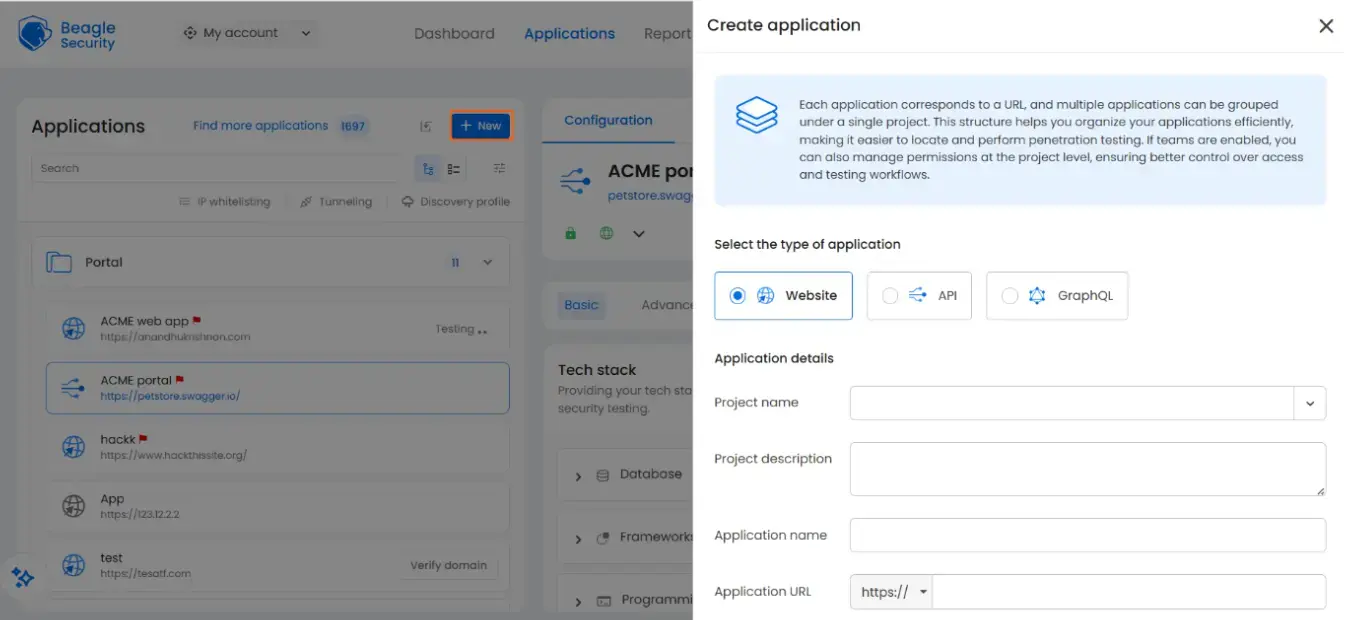
Before you can run a scan, Beagle Security runs domain verification to confirm you are authorised to test the application. Verification requires adding a DNS TXT record or a meta tag to the application. Complete this step before proceeding.
Step 2: Configure the tech stack and authentication
Once the application is added, you land on the configuration view. The Basic tab surfaces a tech stack section where you can specify your database, frameworks, and programming language. Filling this in is not mandatory, but it helps Beagle Security’s testing engine prioritise checks relevant to your stack.
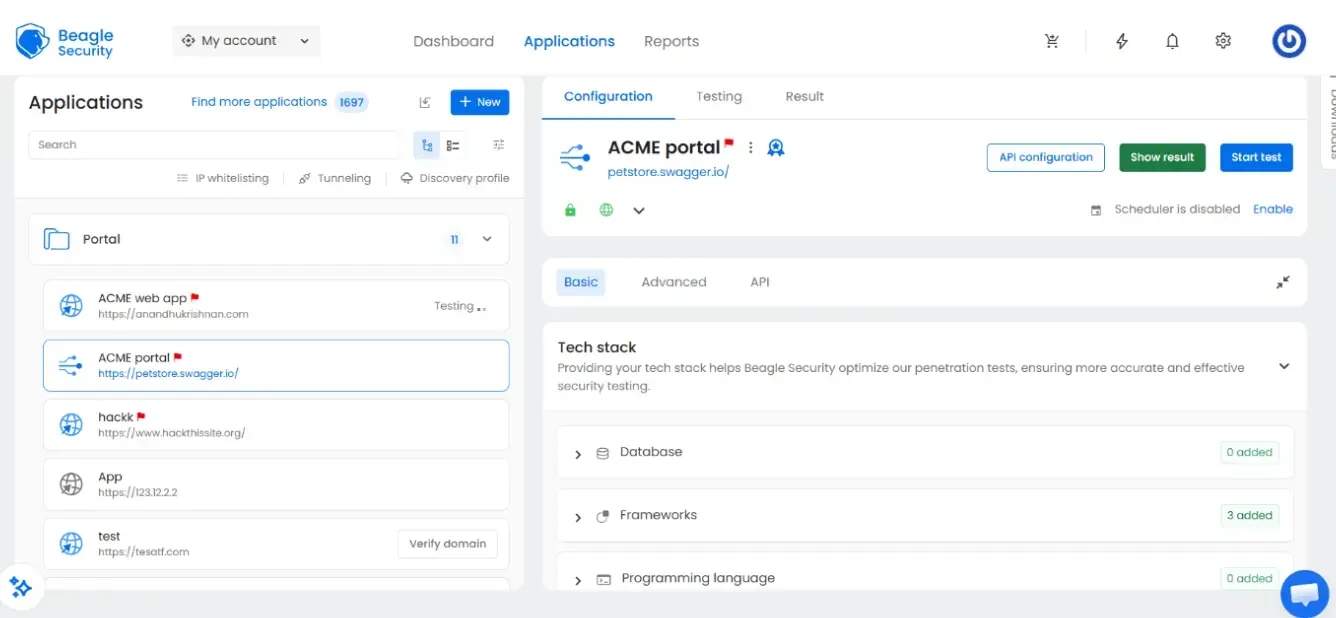
If your application has authenticated surfaces, switch to the Advanced tab to configure login access. Unauthenticated scans miss the majority of the attack surface in most applications. Business logic vulnerabilities, authorisation flaws, and privilege escalation paths only appear once the scanner can access protected routes.
Step 3: Start the scan
Once configuration is complete, click Start test. A “Test started successfully” confirmation appears and the application status in the sidebar updates to Testing
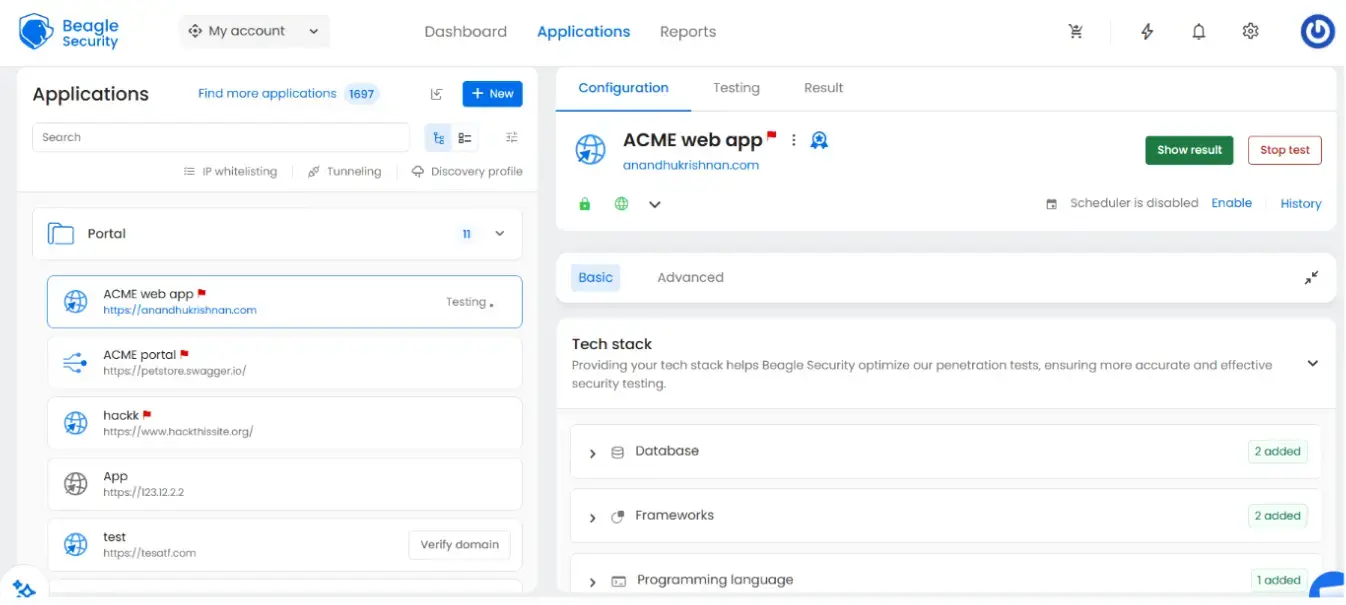
Beagle Security’s agentic AI testing engine crawls the application, maps endpoints, authenticates if configured, and probes for vulnerabilities across the OWASP Top 10 and beyond, including issues specific to modern stacks such as GraphQL injection, mass assignment, and broken object-level authorisation. Findings surface as they are confirmed rather than waiting until the scan completes.
You can stop the scan at any point using the Stop test button if needed.
Step 4: Review results and generate the report
When the scan completes, navigate to the Result view. The dashboard shows your overall CVSS score, a breakdown of findings by severity (critical, high, medium, low, informational), and status tags indicating which findings are new, not fixed, or resolved compared to previous scans.
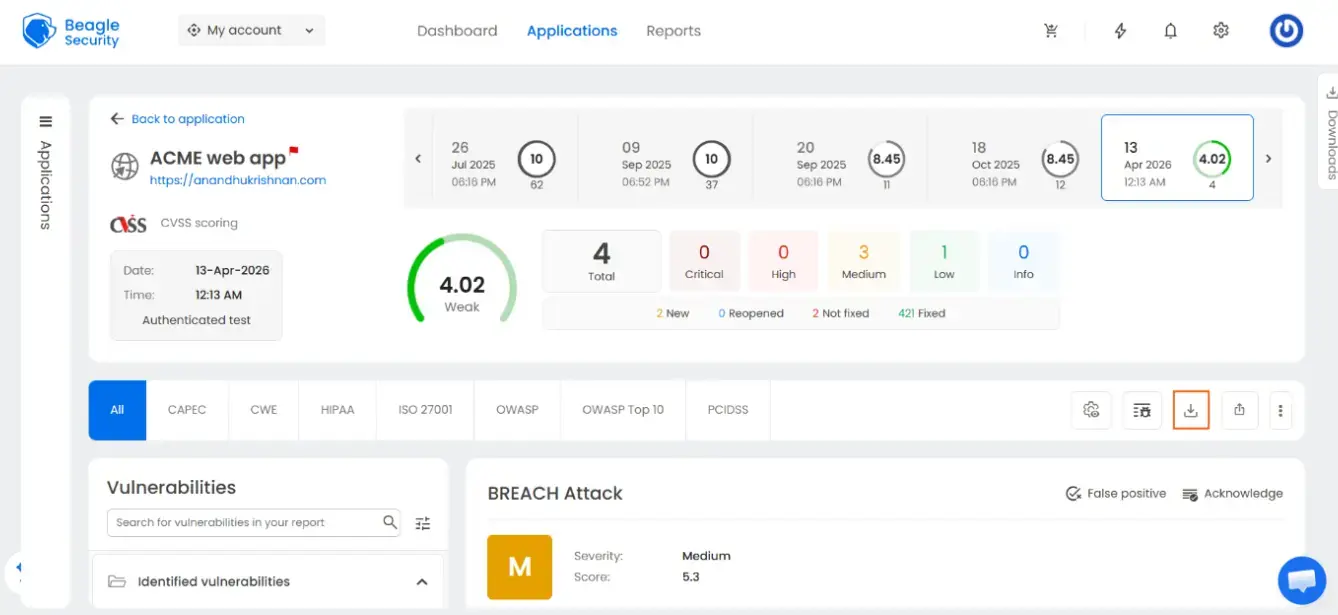
The compliance framework tabs at the top of the findings view let you filter results by CAPEC, CWE, HIPAA, ISO 27001, OWASP, OWASP Top 10, and PCIDSS. Each confirmed finding includes its severity rating, CVSS score, and an Acknowledge option if you are documenting an accepted risk.
To export, use the download icon in the findings toolbar. Beagle Security generates a PDF report with per-finding evidence, remediation guidance, and compliance mappings ready to share.
What to do with your pen test report once you have it
Triage findings before sharing anything
Do not forward a raw report to an enterprise buyer without reviewing it first. This is not about concealing vulnerabilities. It is about presenting your security posture accurately and showing that you take findings seriously.
Remediate critical and high findings
Fix what you can before sharing. For open-source projects, this usually means cutting a patch release that addresses confirmed vulnerabilities and tagging a new version. Document the fixes in your changelog or release notes so the buyer can see the gap between finding and remediation.
Document accepted risks
Not every finding warrants remediation. Some vulnerabilities may be low likelihood in the deployment context, mitigated by controls outside the application, or known and deliberate tradeoffs in the design. Document these explicitly as accepted risks with a rationale.
Share the report directly
Share the report directly rather than summarising it. Buyers who are serious about vendor security will want to read the document.
Present the report as part of a broader security posture
A penetration test report is one signal among several. Buyers running formal vendor security reviews will typically want to see it alongside other evidence.
A published security policy tells buyers how you handle vulnerabilities, what your data handling commitments are, and who to contact with concerns. A responsible disclosure programme, even a simple security.txt file and a dedicated contact, shows you are open to receiving external security research. A clear versioning and patch release cadence shows that fixes reach users promptly rather than being held for major releases.
Keep the report current
A penetration test report has a shelf life. As the codebase evolves, adds features, or changes its authentication model, the coverage of a prior test narrows. Most enterprise security teams treat a report older than twelve months as a starting point for a conversation rather than evidence of current posture.
FAQ
Why is penetration testing necessary?
Penetration testing helps an organization discover vulnerabilities and flaws in their systems that they might not have otherwise been able to find. This can help stop attacks before they start, as organizations can fix these vulnerabilities once they have been identified.
What specific risks does open source face that pen testing uncovers?
Pen tests reveal insecure defaults, authentication and authorization flaws, dependency and supply-chain issues, misconfigurations, and business-logic weaknesses that static review or casual audits often miss. They also simulate chained exploits where multiple small flaws lead to full compromise.
How often should an open-source project be penetration tested?
At minimum: before major releases, after significant architectural changes, and periodically (e.g., annually) for widely used projects; additionally after high-risk dependency updates or when new threat data emerges. Continuous testing (automated scans plus periodic manual pen tests) gives better protection



![Top 10 penetration testing companies [2026]](/blog/images/top-penetration-testing-companies-cover.webp "Top 10 penetration testing companies [2026]")





![Top vendor application security tools [2026]](/blog/images/top-vendor-application-security-testing-tools-2026-cover.webp "Top vendor application security tools [2026]")