How to pass the Salesforce AppExchange security review

The Salesforce AppExchange security review has a well-earned reputation as one of the most demanding marketplace security processes a SaaS company will go through. It combines Salesforce’s own automated scanning with a mandatory third-party penetration test, and it fails submissions for specific, documented reasons that most ISVs only learn about after they have already submitted, paid for a test, and communicated a go-live date to their sales pipeline.
This post covers what the review actually evaluates, what your pen test must demonstrate, what your report must contain, and how to structure your submission so that the first one counts.
What Salesforce’s AppExchange security review evaluates
The review assesses your managed package or connected app, not Salesforce’s infrastructure. Salesforce’s security team is evaluating what your code does inside their platform and how your app handles customer data, authentication, and access control.
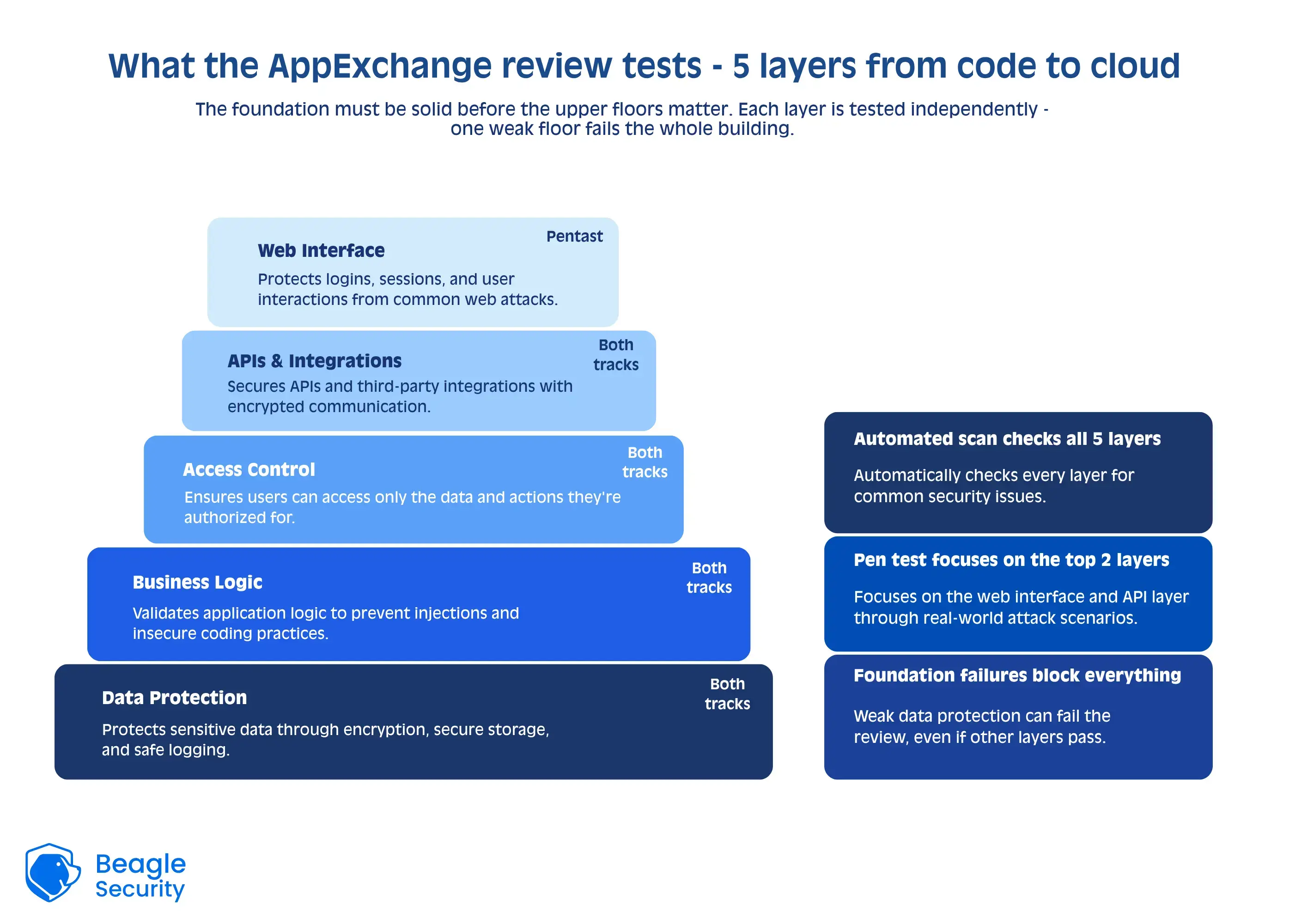
The core evaluation areas are
OWASP Top 10 compliance across your application layer
Authentication and session security including how tokens and session state are managed
Data isolation between orgs confirming that one customer’s data cannot be accessed by another
API security for any REST or SOAP endpoints your package exposes
Handling of customer data stored or transmitted outside Salesforce.
If your app connects to an external system or stores any data outside the Salesforce platform, that external component is in scope. The review does not limit itself to what runs inside Salesforce’s servers.
Salesforce’s automated scanner versus third-party pen testing: what each covers
This is the distinction that trips up more ISVs than any other. Salesforce runs its own automated security scanner as part of every submission, but this scanner does not replace the third-party pen test requirement. Both are mandatory. They cover different things.
| Salesforce automated scanner | Third-party pen test | |
|---|---|---|
| What it analyzes | Apex code and package metadata (static analysis) | Running application behavior under adversarial conditions |
| Vulnerability types | SOQL(Salesforce Object Query Language) injection risks, hardcoded credentials, unsafe API usage, Lightning Locker and LWS policy violations | Authentication flaws, session handling weaknesses, API exposure, data isolation failures, input validation gaps |
| Who conducts it | Salesforce, runs automatically on submission | Qualified external firm or platform, not your internal security team evidence |
| Output required | Scanner results addressed before submission | Formal report with CVSS or OWASP severity classification and remediation |
| Review gate it clears | Code and metadata compliance | Runtime security and third-party testing requirement |
What your pen test must demonstrate for AppExchange
Salesforce’s review team is not looking for a general-purpose penetration test. They are looking for documented evidence that specific risk categories have been tested, in a way that maps directly to the risks your application presents inside subscriber orgs.
OWASP Top 10 coverage must be addressed across every application surface including web interfaces, admin and configuration screens, and any surface accessible to a subscriber org user. Each category must appear explicitly in the report, including categories where no vulnerability was found.
Authentication security must cover your full OAuth implementation: how tokens are requested, stored, and refreshed; what happens when a session expires; whether access controls enforce least privilege at the org and user level. Salesforce is specifically attentive to token leakage, improper refresh token handling, and authentication bypass risks in the connected app flow.
Data isolation is the highest-stakes test area. The tester must demonstrate with documented evidence that data in one subscriber org cannot be accessed from another through API calls, parameter manipulation, or any other technique. This requires testing across at least two separate orgs, with documented attempts to cross the boundary and results confirming the boundary held.
API security must cover all REST or SOAP endpoints your package exposes: authentication bypass attempts, excessive data exposure, missing rate limiting, and error responses that reveal internal architecture.
Input validation must be tested across every user-facing field, parameter, and file upload surface, including stored XSS, reflected XSS, and injection payloads. The report must show what was tested and the outcome for each surface.
What report format Salesforce accepts
The review is satisfied by documentation, not just a completed test. A pen test engagement that was thorough but reported poorly will fail the review on documentation grounds alone.
Salesforce expects the report to include:
A scope statement that explicitly lists the URLs, API endpoints, Salesforce orgs, and any connected infrastructure that were tested and that matches the exact version of the package being submitted
A methodology section describing the testing approach and referencing a recognized framework such as OWASP or PTES
Findings classified by severity using CVSS scores or an OWASP-aligned severity scale (Critical, High, Medium, Low, Informational)
Evidence for each finding like screenshots, request/response pairs, or reproduction steps, not just descriptions
Remediation evidence for all Critical and High findings, showing the fix and confirming it was validated by the tester through a retest
Tester or platform credentials establishing that the assessment was conducted by a qualified third party
Salesforce does not accept self-conducted tests. It does not accept reports that classify all findings as Low without documented justification. Reports that show open Critical or High findings at submission time will not clear review regardless of how thorough the underlying test was.
How a Beagle Security report maps to Salesforce’s requirements
Beagle Security satisfies the third-party penetration testing requirement that Salesforce mandates alongside its own automated scanner. Here is specifically how Beagle Security output maps to what the AppExchange review team expects.
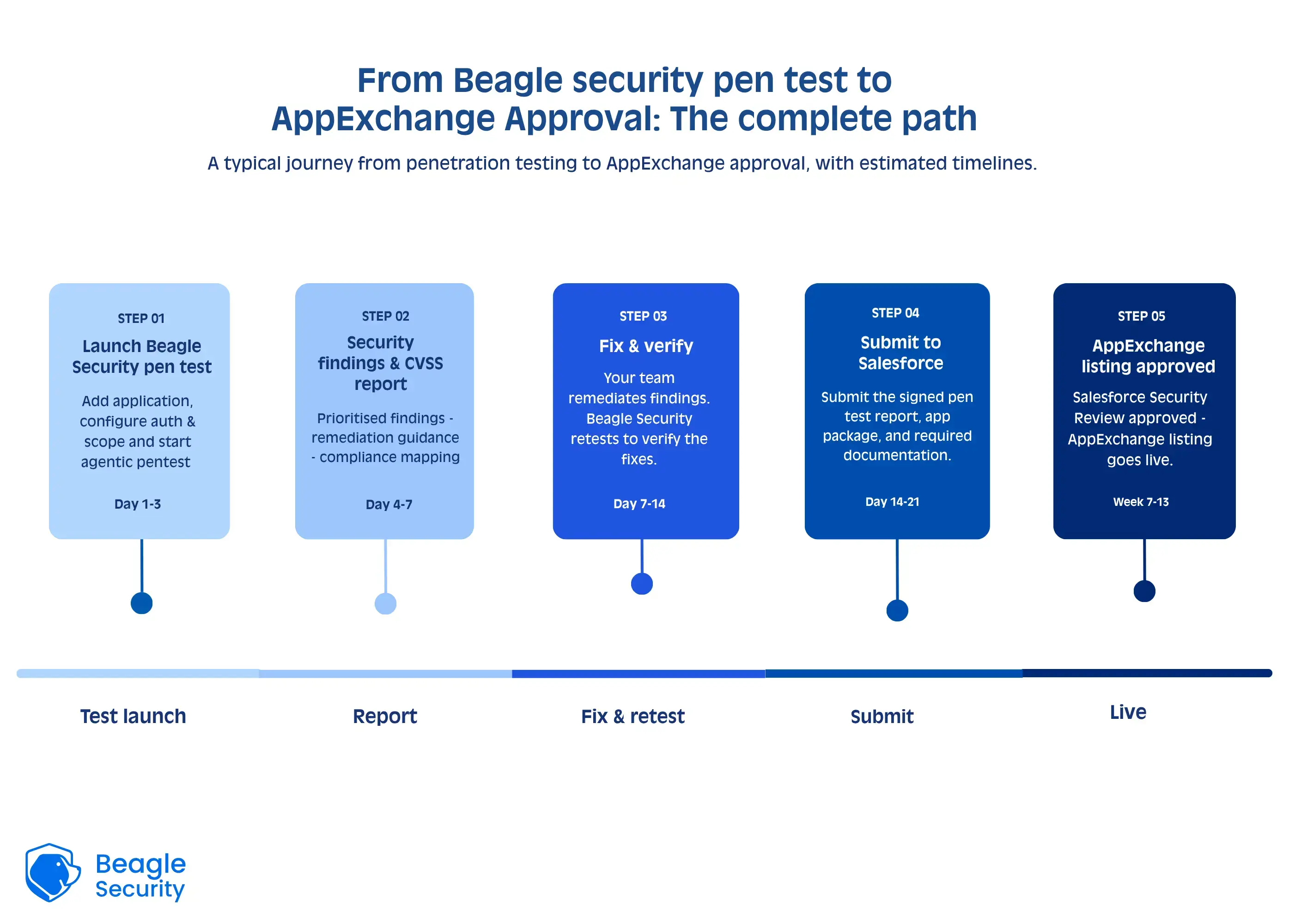
OWASP Top 10 coverage is structured explicitly across Beagle Security reports, with findings organized by OWASP category so reviewers can confirm coverage without cross-referencing a separate methodology document.
CVSS-based severity classification is applied to every finding. Each issue carries a CVSS score and a severity rating: Critical, High, Medium, or Low. This satisfies Salesforce’s requirement for standardized severity classification without requiring you to manually reclassify findings from a proprietary scale.
Scope documentation is included in the report output, specifying the URLs, endpoints, and authenticated surfaces that were tested. This scope statement can be matched directly against the submitted package version.
Authenticated testing covers login-protected surfaces including OAuth flows and connected app authentication, which are required for any pen test submitted alongside a connected app. Session management and token handling are included in this coverage.
API testing covers REST endpoints exposed by the package, including authentication bypass attempts and excessive data exposure checks.
Remediation tracking allows you to document fixes against specific findings and generate updated reports showing remediation status. This is the evidence format Salesforce requires to confirm that Critical and High findings were addressed before submission.
Beagle Security does not replace Salesforce’s own scanner. The scanner handles Apex static analysis. Beagle Security handles the external application layer, authenticated surfaces, and API security that the scanner cannot reach. Both are required, and both must be clean.
Common reasons AppExchange security reviews fail
Most failed submissions fall into the same categories. Each one is avoidable if you know to look for it before submitting.
Open Critical or High findings at submission
Salesforce does not accept remediation plans or timelines for unresolved findings. Every Critical and High issue must be fixed, retested, and documented as resolved before you submit. Submitting with open findings is the single most common rejection reason.
Scope mismatch between the pen test and the submitted package
If the package version submitted for review includes components or endpoints not present in the pen test scope, reviewers will flag the gap. The test scope must match the exact version being submitted.
Missing data isolation evidence
Asserting that your app enforces org-level isolation is not sufficient. The report must show that isolation was actively tested across separate orgs with documented results. Reports that describe data isolation in general terms without test evidence are rejected.
Third-party components not included in scope
If your managed package bundles third-party libraries, SDKs, or integrations, those components must be included in the pen test scope. Reviewers check for dependencies. Untested components in a submitted package are a documented failure reason.
Authentication weaknesses in the OAuth flow
Connected apps that implement OAuth incorrectly, missing state parameters, improper redirect URI validation, insufficient token expiry fail the authentication review. This is an area where authenticated testing is essential; static scanning does not catch runtime OAuth implementation errors.
Insufficient remediation evidence
Showing that a finding was marked resolved in a tracking tool is not the same as showing a retest confirmed the fix. Salesforce expects documented retest evidence for Critical and High findings, not just a status update.
How to prepare your submission: what to complete before you apply
Treat submission preparation as a phase in itself, not a formality that happens after the pen test is done.
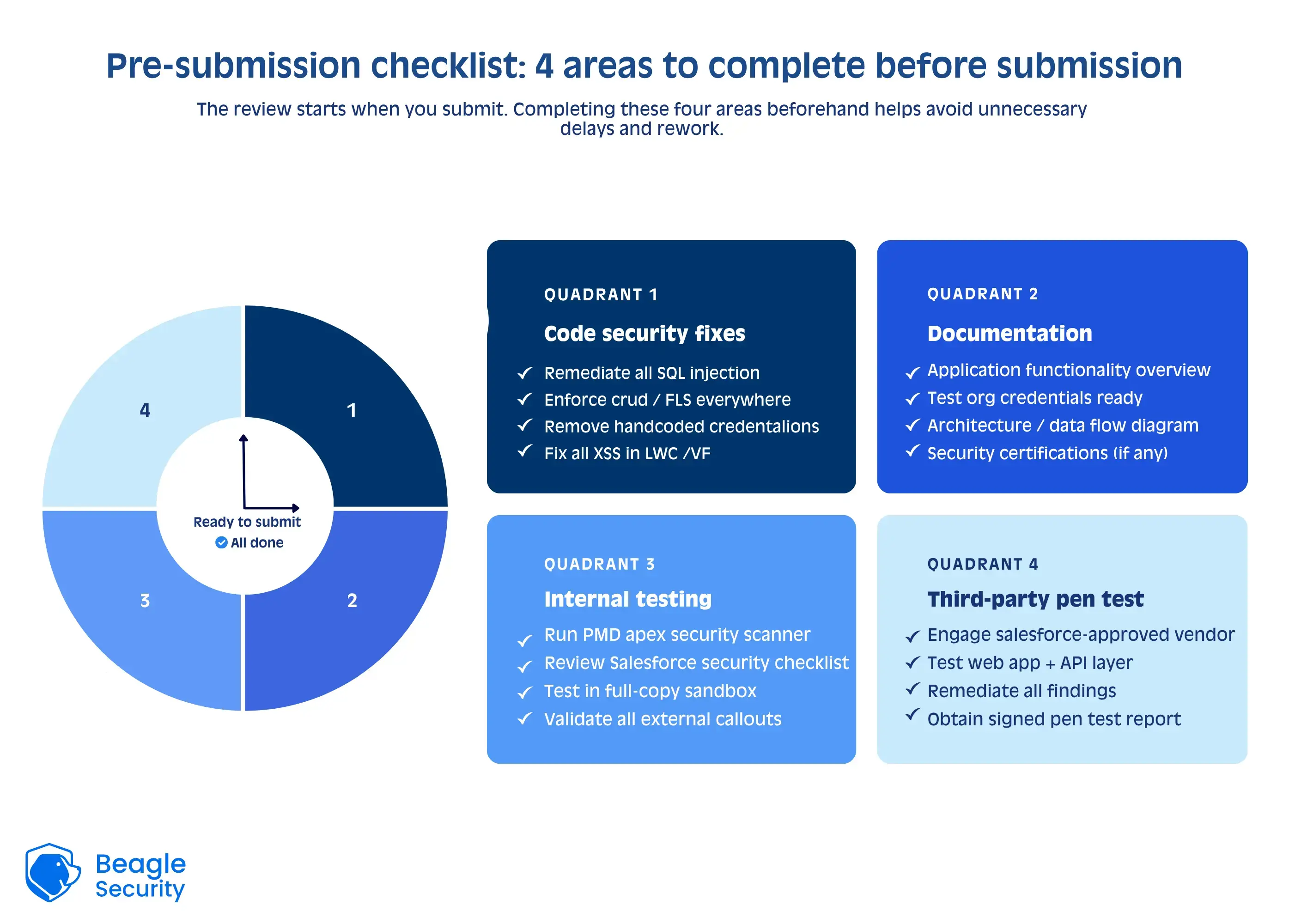
Confirm scope alignment
The version of the package being submitted must match the scope defined in the pen test report exactly. Any update to the package after the test, even a minor one, should be reviewed for whether it introduces new surfaces that should have been in scope.
Remediate and retest all Critical and High findings
Do not move to submission until every Critical and High finding has been fixed and the fix has been validated by the tester. Collect remediation evidence code changes, configuration updates, screenshots for each one.
Test data isolation explicitly
If you have not already done this with at least two separate test orgs, do it now. Document the test and the results. This evidence belongs in the submission.
Audit third-party components
Walk through every dependency, library, and external service your package touches. Confirm each one was included in the pen test scope or can be excluded with documented justification.
Resolve all Salesforce scanner findings
The pen test and the scanner are both required. Scanner findings left open at submission will fail the review regardless of how clean the pen test report is.
Plan for timeline. Salesforce’s review queue adds weeks to the process. A failed submission resets the clock entirely. Getting the first submission right is not just good practice, it is the difference between launching on schedule and adding months to a product rollout.
AppExchange security review submission checklist
Use this as a reference before submitting.
| Checklist item | Status |
|---|---|
| Third-party pen test report completed by a qualified, independent tester or platform | |
| All findings include CVSS scores or OWASP severity classification | |
| All critical and high severity findings remediated with documented retest evidence | |
| Scope statement matches the exact version of the package being submitted | |
| Data isolation between orgs explicitly tested and confirmed in the report | |
| OAuth and connected app authentication flow covered with authenticated testing | |
| All third-party components and libraries within the package included in test scope | |
| Salesforce's automated scanner results reviewed and all flagged items addressed | |
| Remediation evidence assembled for each finding (screenshots, retest results, or code references) | |
| Report format suitable for third-party submission (branded or white-label) |
Final thoughts
The AppExchange security review is not designed to be easy to pass. Salesforce is gatekeeping access to its customer base, and the bar reflects that. Most failed submissions are not the result of genuinely insecure software. They are the result of incomplete documentation, scope mismatches, or missing remediation evidence that could have been caught before the submission went in.
The process has two distinct tracks: Salesforce’s automated scanner covering your Apex code and metadata, and a third-party pen test covering your running application. Neither substitutes for the other. If your pen test report is complete, scoped correctly, and free of unresolved critical and high findings, you have cleared the hardest part of the submission.
Beagle Security produces the OWASP-mapped, CVSS-classified, remediation-tracked report that the AppExchange review team expects. If you have a submission timeline, run your test early enough to remediate and retest before you apply. A clean report going in is the only version that counts.
Start your 14-day free trial or explore the interactive demo to see it in action.
FAQs
How much does the AppExchange security review cost?
The Salesforce AppExchange security review process ensures your app meets the platform’s high-security standards. While the system has recently changed, here’s a breakdown of the current fee structure: Initial Security Review: Paid Apps: A one-time fee of $999 applies to all paid app submissions.
What is the AppExchange security review?
It is a manual + automated security review performed by Salesforce’s Product Security team to ensure your app does not expose security risks to customers or the platform.
What is periodic re-review, and what is its fee applicability?
Salesforce charges the same $999 fee for paid apps in case they are due for a periodic re-review; after your app is approved and listed, Salesforce runs risk factors reports on AppExchange Apps; it helps them flag apps due for periodic re-reviews based on:
Time elapsed since the last review(could be six months to two years).
Potential risk based on any significant changes made in the app(this is a huge factor).


![Top ZAP alternatives and competitors [October 2026]](/blog/images/top-zap-alternatives-cover.webp "Top ZAP alternatives and competitors [October 2026]")




![Top 10 penetration testing companies [2026]](/blog/images/top-penetration-testing-companies-cover.webp "Top 10 penetration testing companies [2026]")


![Top vendor application security tools [2026]](/blog/images/top-vendor-application-security-testing-tools-2026-cover.webp "Top vendor application security tools [2026]")



![Top Snyk alternatives & competitors [2026]](/blog/images/top-snyk-alternatives-cover.webp "Top Snyk alternatives & competitors [2026]")